Company Email Signatures
Multilingual email signatures with a QR code, driven by one company-wide design; employees copy them with one click and paste them into Outlook or Gmail.
The email signature is one of your company's most visible brand touchpoints, seen every single day. Yet in most companies every employee's signature uses a different font, a different logo and outdated phone numbers. The EcoQrCard email signature module lets you define the signature design once at company level, while the content comes automatically from each employee's business card details.
What problem does it solve?
Hand-made signatures run into the same problems again and again: misspelled job titles, an old logo, a missing legal disclaimer, a Turkish-language signature sent to an international customer. Every new hire copies their signature from a colleague's email, and the mistakes multiply. Marketing wants consistency, and IT does not want to set up signatures on every computer one by one.
The module is shared between two roles:
- The company administrator designs the look: template, colors, font sizes, logo, QR code and legal disclaimer. Settings apply to all users as soon as they are saved.
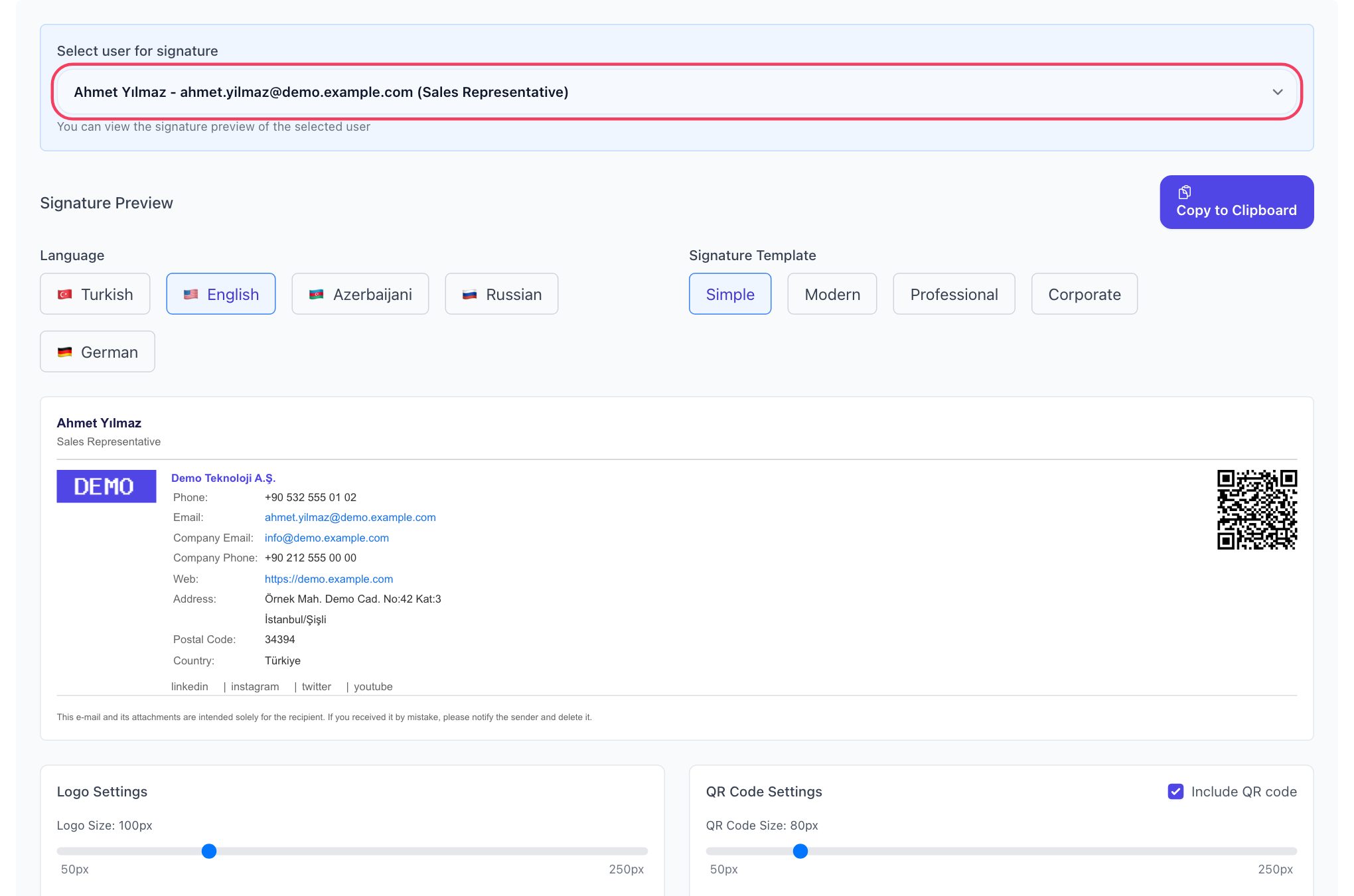
- Each employee opens the Email Signature page with their own account, chooses the language, clicks Copy to Clipboard and pastes the signature into their email client.
How does it work?
- Complete your company details: Logo, address, phone, website and social media accounts are entered once, and every signature uses them.
- Create the business cards: The personal details in the signature come from the digital business card, so every employee needs an active business card. For large teams, you can import users in bulk via Excel and have their business cards created automatically.
- Define the design: Set the template, colors, QR code and legal disclaimer; preview the signature with different employees to check short and long job titles, then save.
- Let employees get their signature: Each employee copies their signature from their own page and adds it to their email client once.
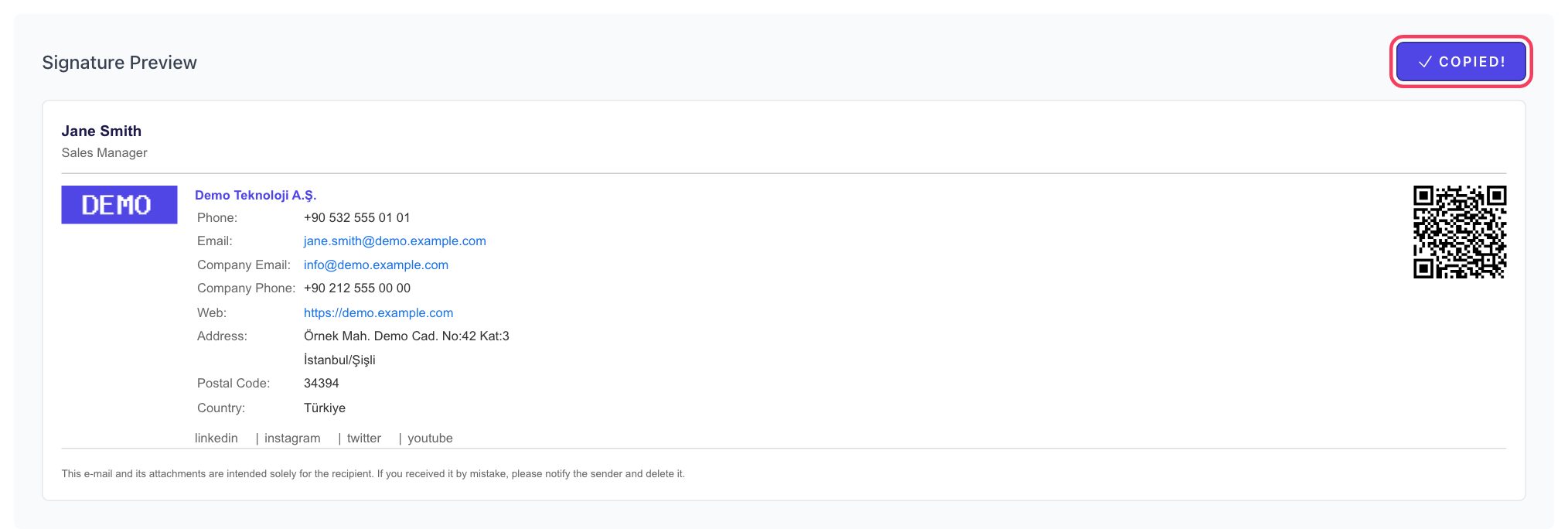
Nothing in the signature is typed by hand: name, job title, phone and email come from the business card; the logo and company contact details come from the company information; social media accounts come from the business card extras. The signature and the business card draw on the same source.
Four ready-made signature templates and template locking
Choose one of four templates to match your corporate identity: Simple, Modern, Professional and Corporate.
If brand consistency is your priority, you can lock the template. While Allow users to change template is switched off, the whole company uses the template you chose. If you switch it on, employees can choose between the four templates, while the color, font size, logo, QR code and legal disclaimer settings still stay as you defined them.
Appearance settings
| Setting | Options |
|---|---|
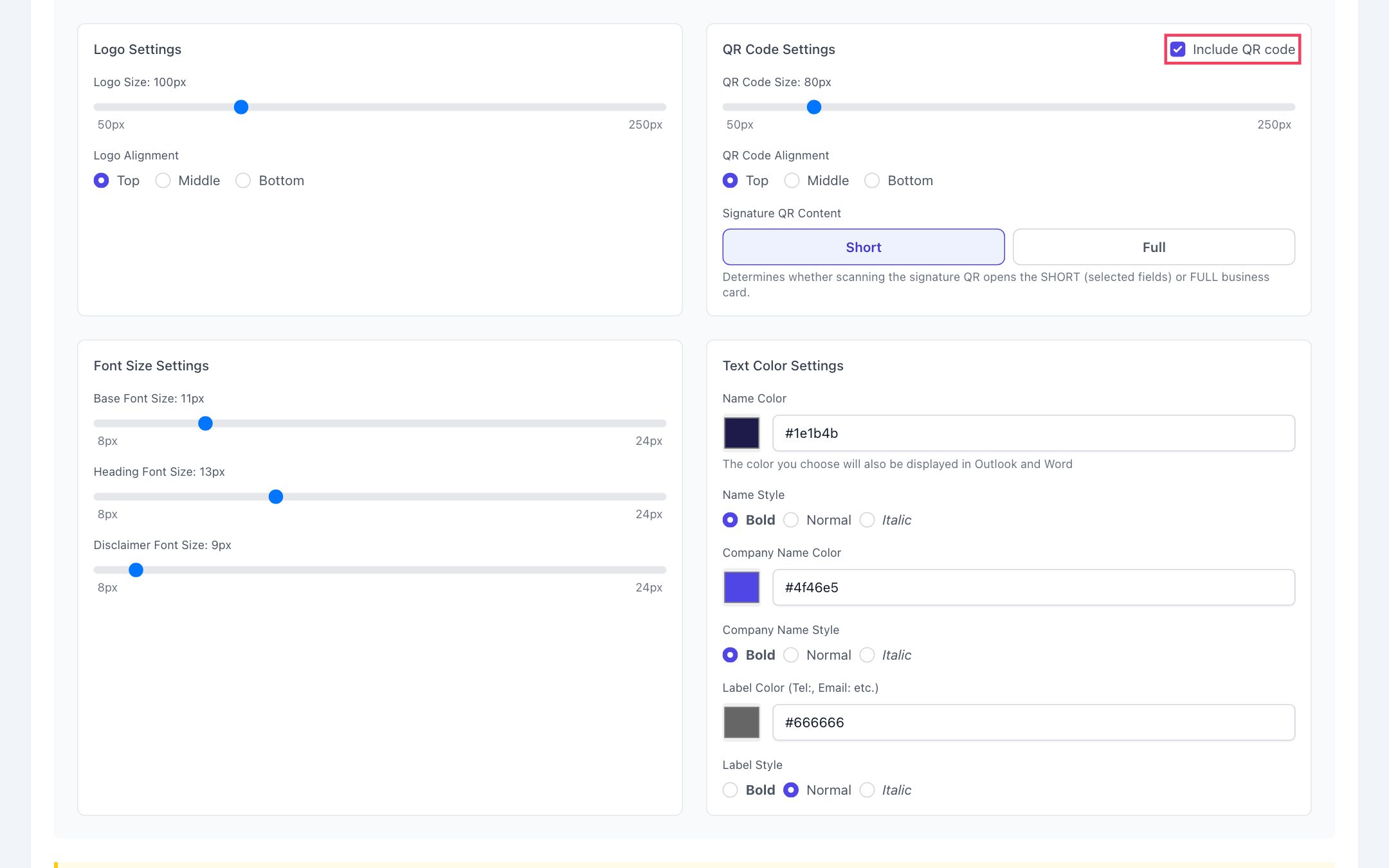
| Logo | Size 50–250 pixels; top, middle or bottom alignment |
| QR code | On / off; size 50–250 pixels; alignment; short or full business card |
| Font sizes | 8–24 pixels for body text, headings and the legal disclaimer |
| Color and style | Color plus bold, normal or italic style for the name, company name and labels |
You can pick colors with the color picker or enter your corporate color code in #1A2B3C format.
Email signature with a QR code
You can add the employee's business card QR code to the signature. When the recipient scans it with their phone, the sender's digital business card opens and can be saved to their contacts with one tap. Every email becomes a business card exchange, with no contact details to type in.
You choose whether the QR code in the signature opens the short or the full business card. The short business card shares only the company details you selected and is usually the better fit for an email signature.
Signatures in five languages and multilingual legal disclaimers
Signatures can be created in Turkish, English, Azerbaijani, Russian and German. When the language changes, so do labels such as "Tel" and "Email", the job title, the legal disclaimer and the language of the business card the QR code opens. Employees copy the signature in the right language for the person they are writing to.
There are two options for the legal disclaimer (confidentiality notice):
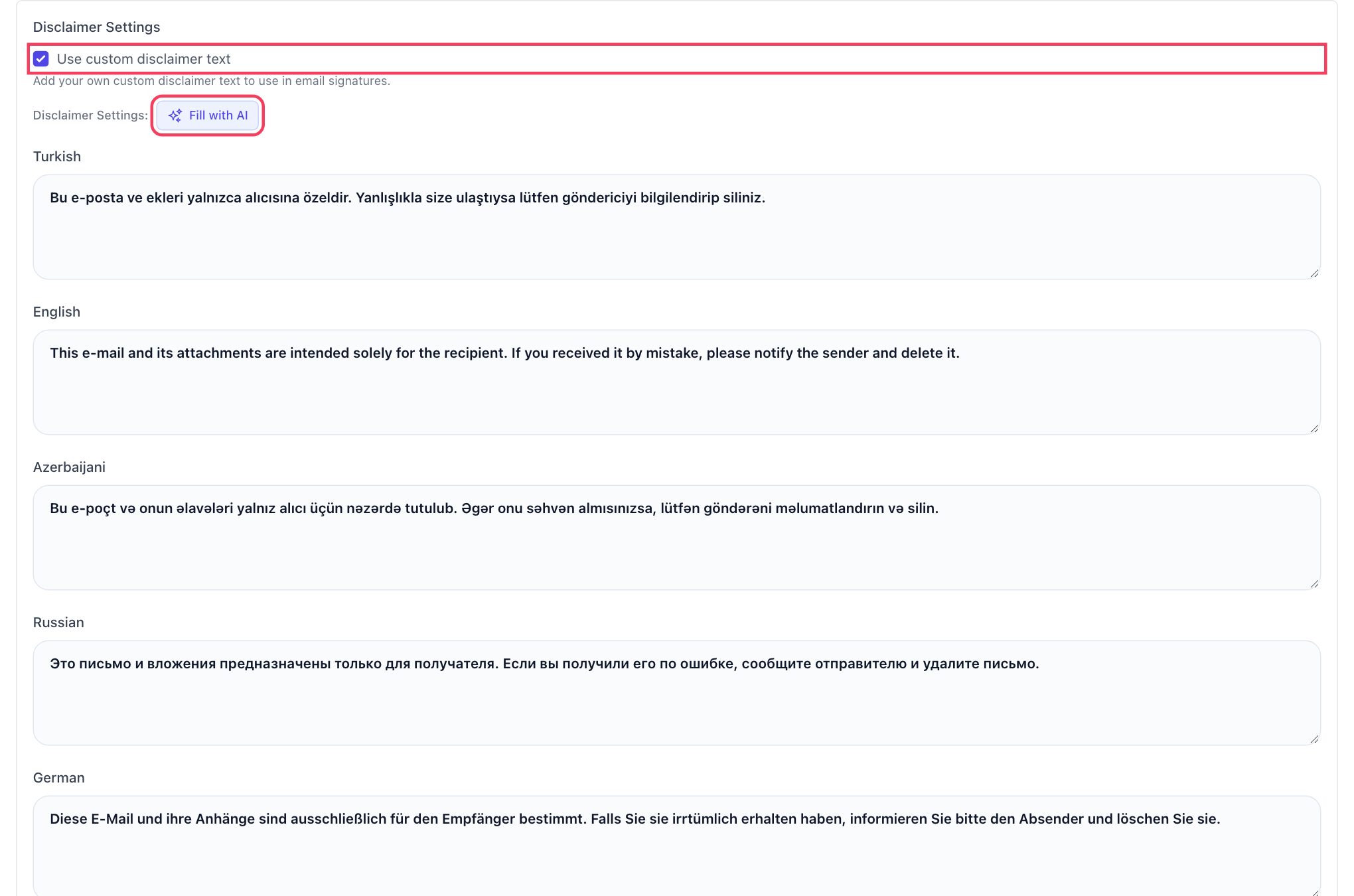
- Standard text: A standard legal disclaimer is added in the signature's language.
- Custom text: You enter the text approved by your legal team separately for each language. Write it in one language and click Fill with AI, and the empty languages are translated automatically; you just review them before saving.
Compatible with Outlook, Gmail and Apple Mail
The signature is built in an HTML structure that email clients support. Copy to Clipboard copies the signature together with its table layout, colors, logo and QR image, and it can be pasted into:
- New Outlook and Outlook on the web
- Classic Outlook (Windows desktop)
- Outlook for Mac
- Gmail (in the browser)
- Apple Mail
The selected colors are preserved in Outlook and Word as well. For step-by-step instructions, see our guides on adding an email signature in Outlook and adding an email signature in Gmail.
Signature fields in phone apps usually accept plain text only. We recommend using the QR code signature in the email client on your computer or in your email account in the browser, and a short text signature on your phone.
Everyday use cases
- New hires: Once their business card is created, new employees copy their signature from their own page on day one, without asking anyone for a template.
- Job title or phone number change: The business card is updated and the employee copies the new signature once more.
- Rebrand or office move: The logo or address changes in the company information; the team copies the new signature and the design stays the same for everyone.
- International correspondence: The export team uses an English, Russian or German signature with its customers.
- Legal compliance: The approved legal disclaimer appears in every signature, to the same standard in every language.
Why central signature management?
| Scattered signatures | With EcoQrCard |
|---|---|
| Every employee designs their own signature | The design is defined once at company level |
| Old logos and job titles circulate for years | Details come automatically from the current business card |
| Legal disclaimer missing or inconsistent | Approved text, to the same standard in every language |
| A signature in the wrong language for international customers | Signatures in five languages, switch language with one click |
| Contact details as plain text only | Saved to contacts with one tap via the QR code |
If you are wondering what a good company email signature should include, our corporate email signature guide offers a comprehensive checklist.
Set your signature standard today
The email signature module works in the same platform as the digital business card and the company address book. For a setup tailored to your company and pricing details, request a quote.
Frequently Asked Questions About Email Signatures
Do employees enter their signature details themselves?
No. Name, job title, phone and email come automatically from the employee's business card, and the logo and company details come from the company settings. The employee only chooses the language (and the template, if allowed) and copies the signature.
Does the signature work in Outlook?
Yes. The signature is copied in an HTML-compatible format and can be pasted into new Outlook, Outlook on the web, classic Outlook and Outlook for Mac. Gmail and Apple Mail are supported as well.
Can I require all employees to use the same template?
Yes. When you switch off the template selection permission, all users use the template you chose and cannot change it.
Can I add a QR code to the signature?
Yes. You can add the employee's business card QR code to the signature, and you decide its size, alignment and whether it opens the short or the full business card.
Is the signature updated when an employee's job title changes?
When the details on the business card are updated, the signature in EcoQrCard is updated too. A signature already pasted into an email client does not change by itself; the employee needs to copy the new signature once more and paste it in place of the old one.