Email Signatures
What Makes a Good Corporate Email Signature?
What a corporate email signature should contain, how to handle the legal disclaimer, design rules and how to keep signatures consistent across all employees.
An employee sends dozens of emails a day, and every one of them ends with a few lines that represent your company. When those lines are prepared with care, they build trust, make communication easier and keep your brand consistent. In a company where every employee designs their own signature to their own taste, you end up with different logos, old phone numbers and colors that are hard to read. In this guide we explain what a corporate email signature should look like and how to keep it consistent across the whole team.
Why does a corporate email signature matter?
- Trust: A complete, tidy signature reinforces the impression that the email really comes from your company.
- Accessibility: Recipients do not have to search for information to call you or visit your website.
- Brand consistency: All employees using the same design gives a professional impression.
- Up-to-date information: Centrally managed signatures make sure everyone shares the right details when an address or phone number changes.
What should a signature include?
| Element | Required? | Recommendation |
|---|---|---|
| Full name | Yes | The most prominent line of the signature |
| Job title and department | Yes | Short and clear; avoid abbreviations |
| Company name and logo | Yes | Logo at a reasonable size, a single image |
| Phone | Yes | Use international format (+44 ..., +49 ...) |
| Email address | Recommended | Useful in forwarded messages |
| Website | Yes | Short and clickable |
| Address | Optional | Recommended for businesses that receive visitors |
| Social media | Optional | Only active corporate accounts |
| QR code | Optional | Links to the digital business card, makes saving to contacts easy |
| Legal disclaimer | Depends on the industry | Short, small font, at the very bottom of the signature |
What should not be in a signature: Personal quotes, animated images, multiple banners, private phone numbers, campaign announcements that change every day and logos added as file attachments.
The legal disclaimer
Many companies add a confidentiality and liability notice at the bottom of their emails. This text usually states that:
- The email and its attachments are intended only for the recipient and may contain confidential information
- Anyone who receives it by mistake should notify the sender and delete the message
- Readers can find the privacy notice on how personal data is processed (usually via a link)
For companies that process the personal data of people in the European Union, the GDPR is on the agenda, and many countries have their own data protection laws as well. In addition, company law in many jurisdictions requires certain details, such as the registered company name, registered office and registration number, to appear on business correspondence, which may include emails. How these obligations apply to your emails depends on your company's structure, industry and the countries you operate in. We recommend working with your legal adviser when drafting the text; this guide is not legal advice.
Practical tips:
- Keep the disclaimer short; long paragraphs do not get read and weigh down the signature.
- If you correspond with international customers, prepare the disclaimer in English (or the relevant language) as well.
- Set the disclaimer in a smaller font than the main text, in gray.
- Rather than putting a detailed privacy notice in the signature, link to the page on your website.
Design rules
- Keep it simple: A good signature does not exceed 4-7 lines. The eye should find the most important information immediately.
- Common fonts: Fonts available on every device, such as Arial, Calibri or Verdana, look consistent.
- Limited colors: One or two shades of your corporate color are enough.
- Readable size: Body text is usually 10-12 pt, the legal disclaimer smaller.
- Lightweight images: The logo and QR code should be small but sharp; heavy images bloat the email.
- Text rather than images: Do not create the whole signature as a single image. When images are blocked, the recipient sees no information at all; the text also cannot be selected or clicked.
- Mobile-friendly: A large share of messages are read on a phone. Wide tables and many side-by-side columns can break on a phone.
- Dark mode: Logos with a transparent background can disappear in dark mode; test the logo on both dark and light backgrounds.
Sample signature structure
The skeleton below is a good starting point for most companies (the details are examples):
| Line | Content |
|---|---|
| 1 | Full Name (bold, corporate color) |
| 2 | Job Title · Department |
| 3 | Company Name + logo |
| 4 | Tel: +44 ... · Email: [email protected] |
| 5 | company.com · City |
| 6 | QR code (on the right or below, small) |
| 7 | Legal disclaimer (small, gray) |
In this structure, the most important information is at the top and the supporting information below. Placing the logo and QR code next to the text keeps the signature from growing too tall.
Does it make sense to add a QR code to a signature?
The main purpose of a QR code in an email signature is to make it easy for the recipient to save your details to their contacts. Someone reading the email on a desktop can scan the code in the signature with their phone, open your digital business card and save it with a single tap. If the code points to a business card page with your current details, there is an added advantage: even if your signature is out of date, the information the QR code opens is current. We explain how digital business cards work in our guide what is a digital business card.
Keep the QR code small but scannable, and position it so that it does not overshadow the signature's main information.
How do you keep signatures consistent across all employees?
The hardest part of a corporate signature is not the design, but putting it into practice. Typical problems:
- Every employee copying the signature by hand, editing it with their own details and making mistakes along the way
- The old logo staying in use for months after the logo changes
- New employees not being able to find the signature template
- Different templates circulating in different offices
The way to prevent this is to generate signatures from a central source: define the design once, fill in personal details automatically from an up-to-date employee record and let employees simply copy the final version.
Common mistakes
- Making the whole signature a single image
- Using a very large logo or banner
- Sending the full signature with images in every reply as well
- An old address, job title or phone number
- Every employee using different colors and fonts
- Legal disclaimers too long to read
- Not setting up a signature in the mobile app at all
- Using a signature and disclaimer in only one language when corresponding with international customers
Managing corporate signatures with EcoQrCard
EcoQrCard email signatures are designed to manage signatures company-wide from one place. The company administrator defines the look once; each employee's personal details come automatically from their own QR business card, and the company details and logo from the company settings.
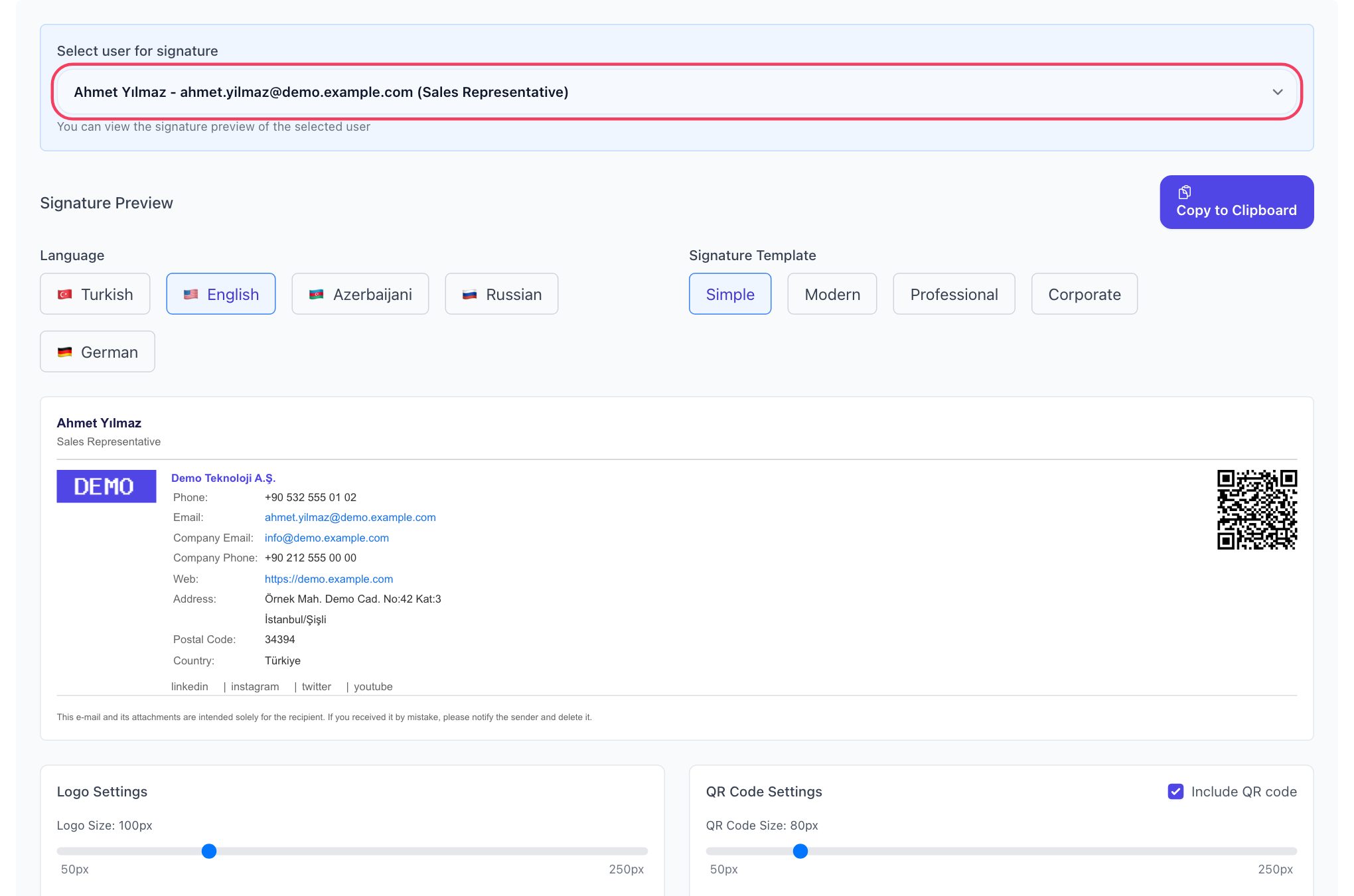
- 4 templates: Simple, Modern, Professional and Corporate. If they wish, administrators can lock the template for all employees.
- Appearance settings: Logo and QR code size and alignment, font sizes, and colors for the name, company name and labels.
- QR code: A QR code that opens the employee's digital business card is added to the signature; you can choose the short or full business card.
- 5 languages: Signatures can be prepared in Turkish, English, Azerbaijani, Russian and German; labels and the job title change with the selected language.
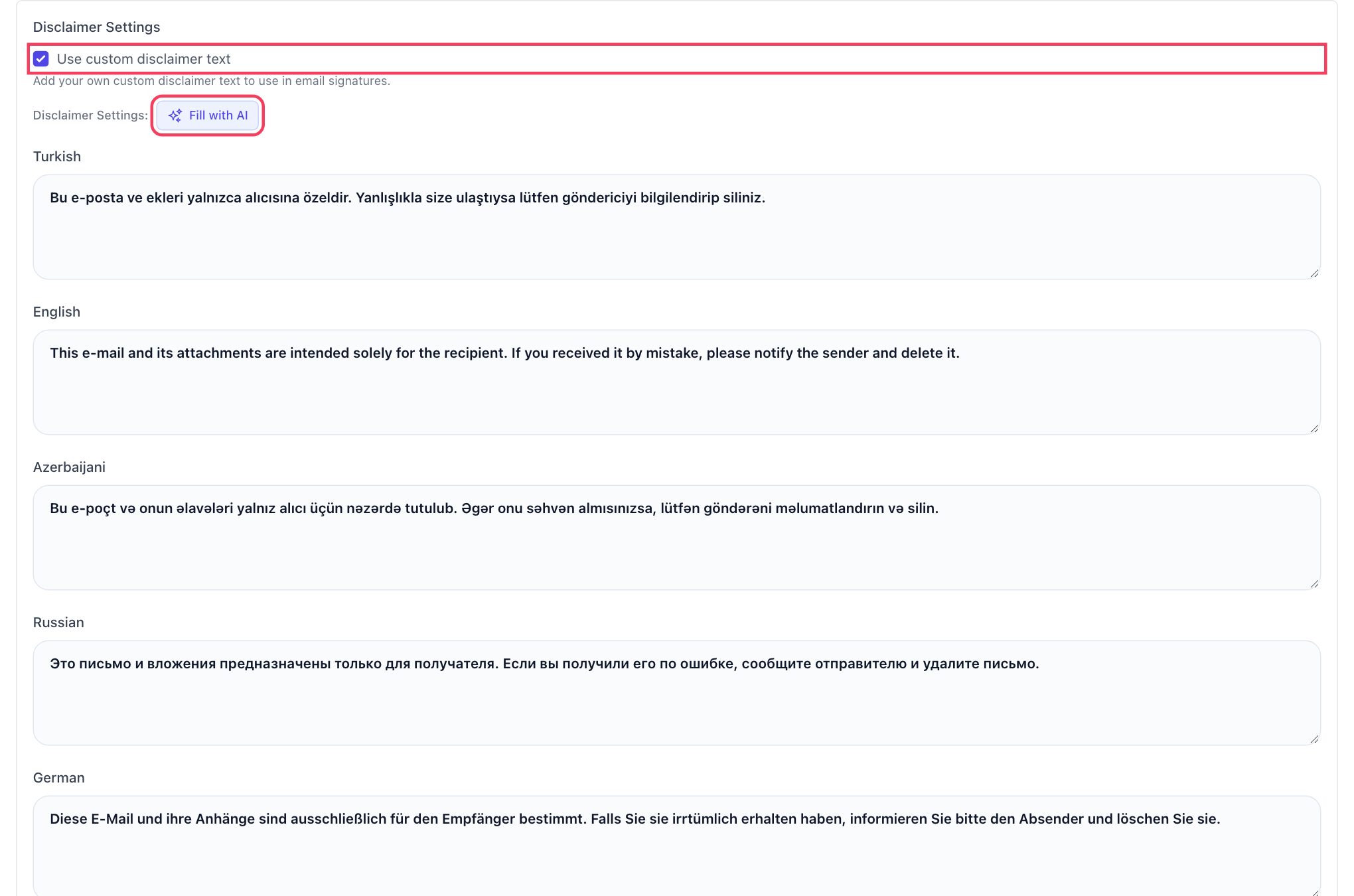
- Multilingual legal disclaimer: Use the standard text or write your own for each language; fill in one language and complete the others with AI-assisted translation.
- Easy setup: Employees copy their signature with its formatting using Copy to Clipboard and paste it into Outlook, Gmail or Apple Mail.
- Updates: A signature pasted into an email program is a copy from that moment. When the logo, template or personal details change, the updated signature is ready in EcoQrCard straight away; employees simply copy it again and paste it in place of the old one. The business card opened by the QR code in the signature stays up to date in the meantime.
To show employees how to add the signature to their own email program, you can share our guides on adding an email signature in Outlook and adding an email signature in Gmail. The digital business card opened by the QR code in the signature is managed from the same dashboard.
If you would like to bring all your company's signatures together in a single design, request a quote and we will review your current signature setup together.
Corporate signature checklist
- Are name, job title, company, phone and website all present?
- Is the logo sharp and a reasonable size?
- Is the signature between 4 and 7 lines?
- Is the legal disclaimer short and available in the languages you need?
- Do all employees use the same template?
- Does the information come from an up-to-date source?
- Has it been tested on a phone and in dark mode?
Frequently Asked Questions
Is a legal disclaimer mandatory in a corporate email signature?
That depends on your company's structure, industry and the countries you correspond with. Rules on business correspondence and data protection legislation such as the GDPR should be taken into account. For a definitive answer, consult your legal adviser.
How many lines should a signature have?
The generally accepted approach is 4-7 lines: name, job title, company, phone, website and, if needed, address. The legal disclaimer can go below these lines in a smaller font.
Why is it wrong to create the whole signature as an image?
Many email programs block images by default, in which case the recipient sees no information in the signature at all. In addition, a phone number or email address in an image cannot be clicked or copied.
How do I make sure all employees use the same signature?
Generating signatures from a central system is the most reliable way. In EcoQrCard, the administrator defines the template and appearance and can lock the template, while employees' details come automatically from their business cards.
Should I use the full signature in replies too?
Not necessarily. In long email threads, sending the full signature with a logo in every reply makes messages unnecessarily long. Many companies use the full signature for new messages and a short one for replies.