Digital Business Cards
What Is a Digital Business Card? How Do QR Business Cards Work?
We explain what a digital business card is, how it is shared with a QR code and how a company can set one up for every employee, step by step.
A digital business card keeps your contact details on a web page instead of on paper and is usually shared through a QR code or a link. The other person scans the code with their phone camera, sees your details on screen and saves them to their contacts with a single tap. In this guide we explain how digital business cards work, what they should include and how a company can roll them out to every employee in an organized way.
What exactly is a digital business card?
A traditional business card prints your name, job title, phone number and email address on a small piece of card. A digital business card presents the same details (and more) on a mobile-friendly card page published online. The most common way to reach that page is a QR code, but the same page can also be shared as a link via WhatsApp, email or an email signature.
A digital business card has three core parts:
- The card page: The page that shows the person's details, the company logo, social media accounts and links.
- The sharing tool: Usually a QR code, along with a short link and a contact file.
- The contact card (vCard / .vcf): The standard file format that phone and computer address books recognize. When someone taps "Add to Contacts", this file is downloaded and all the details are written to the address book in one go.
How does a QR business card work?
For the other person, the whole process takes a few seconds:
- The card owner shows their QR code: on a phone screen, on printed material, on a name badge or in an email signature.
- The other person points their phone camera at the code. Most modern smartphones read QR codes with the built-in camera, without a separate app.
- The phone shows the link to the card page; one tap opens the page.
- The visitor sees the details and can call, send an email or go to the website or social media accounts.
- When they tap Add to Contacts, the contact card is downloaded and the details are saved to their contacts.
The key point is this: in most cases the QR code does not contain the details themselves but the address of the card page. So when the card owner's phone number or job title changes, only the information on the page is updated; QR codes that have already been handed out keep working and show the current details. For more on this distinction, see our guide to static vs. dynamic QR codes.
What should a digital business card include?
A good digital business card contains everything the other person needs to get in touch with you, without unnecessary clutter.
| Information | Required? | Note |
|---|---|---|
| Full name | Yes | This is the name saved to the address book; write it consistently. |
| Job title and department | Yes | Add the equivalent in other languages for international meetings. |
| Mobile and work phone | Yes | Label the type (mobile, work) so people call the right number. |
| Work email | Yes | Use the company address rather than a personal one. |
| Company name, logo, website | Yes | For trust and brand consistency. |
| Company address, branch addresses | Recommended | Especially useful for businesses that receive visitors. |
| Social media accounts | Optional | Only corporate accounts that are actively used. |
| Catalog, brochure, links | Optional | Very useful for sales teams. |
| Tax and billing details | Optional | Speeds up accounting correspondence in B2B relationships. |
You do not have to share everything everywhere. For example, it makes sense to show a leaner card in your email signature and a more complete one in face-to-face meetings.
Benefits of a digital business card
- Always up to date: When details change, the card page is updated, with no reprinting.
- Never runs out, never left behind: If you have your phone with you, you have your business card with you.
- Saved to contacts in one step: Nobody has to type your details by hand, which reduces the risk of typos.
- Richer content: Social media, website, catalog and documents can all be part of the card.
- Measurable: You can see how many times the card was opened and get a rough idea of the impact of events or campaigns.
- Multilingual use: International customers can open the card in their own language.
- Less paper: Fewer cards that are printed often and go out of date quickly. For a cost and environmental comparison, see our guide paper vs. digital business cards.
A personal tool or a company-wide system?
For a one-person business, a simple digital business card may be enough. But in a company with dozens or hundreds of employees, the real need is management:
- All cards should use the same corporate design and logo.
- When the company address, website or social media changes, the change should reach every card from one place.
- The card of an employee who leaves should be deactivated immediately.
- A new employee's card should be ready within minutes.
- You should be able to see which cards are used and how much.
At company scale, employees creating business cards on their own with different apps leads to an inconsistent brand and outdated information. For companies, then, the right question is not "should we use digital business cards?" but "how will we manage the cards centrally?".
Common mistakes to avoid
- Printing the QR code too small: On printed materials, make sure the code is large enough to scan comfortably and has some clear space around it.
- Mixing in personal details: Sharing a private phone number or personal email address on a company card can cause problems later.
- Not testing the card: Before handing it out, scan it with different phones and try the "Add to Contacts" step.
- Leaving cards of former employees active: An old card can send a customer to someone who no longer works at the company.
- Using only one language: If you work with partners abroad, add at least an English version of the job title and department.
Company digital business cards with EcoQrCard
The EcoQrCard digital business card system is designed to let companies manage all their employees' QR business cards from one dashboard. The company administrator creates a card for each employee, and the company name, address, logo and website are added to the card automatically. When an employee's details change, the card is updated instantly; you do not need to replace QR codes that have been printed or shared.
Key features:
- Short and Full QR: Every card has two QR codes. Both include the person's details and the company's core contact information; the Short code, intended for small spaces such as an email signature, shares only the additional details (social media, tax, branch addresses and so on) that the administrator has selected, while the Full code includes all of them.
- 5 languages: Job title and department can be entered in Turkish, English, Azerbaijani, Russian and German; fill in one language and complete the others with AI-assisted translation.
- Add to Contacts and sharing: Visitors save the contact card with one tap; employees share their card via WhatsApp, as a link or as a QR image.
- 10 ready-made card designs: The look of the card page is chosen company-wide.
- Company extras: Social media, branch addresses, documents and links, tax and billing details are added to all cards from one place.
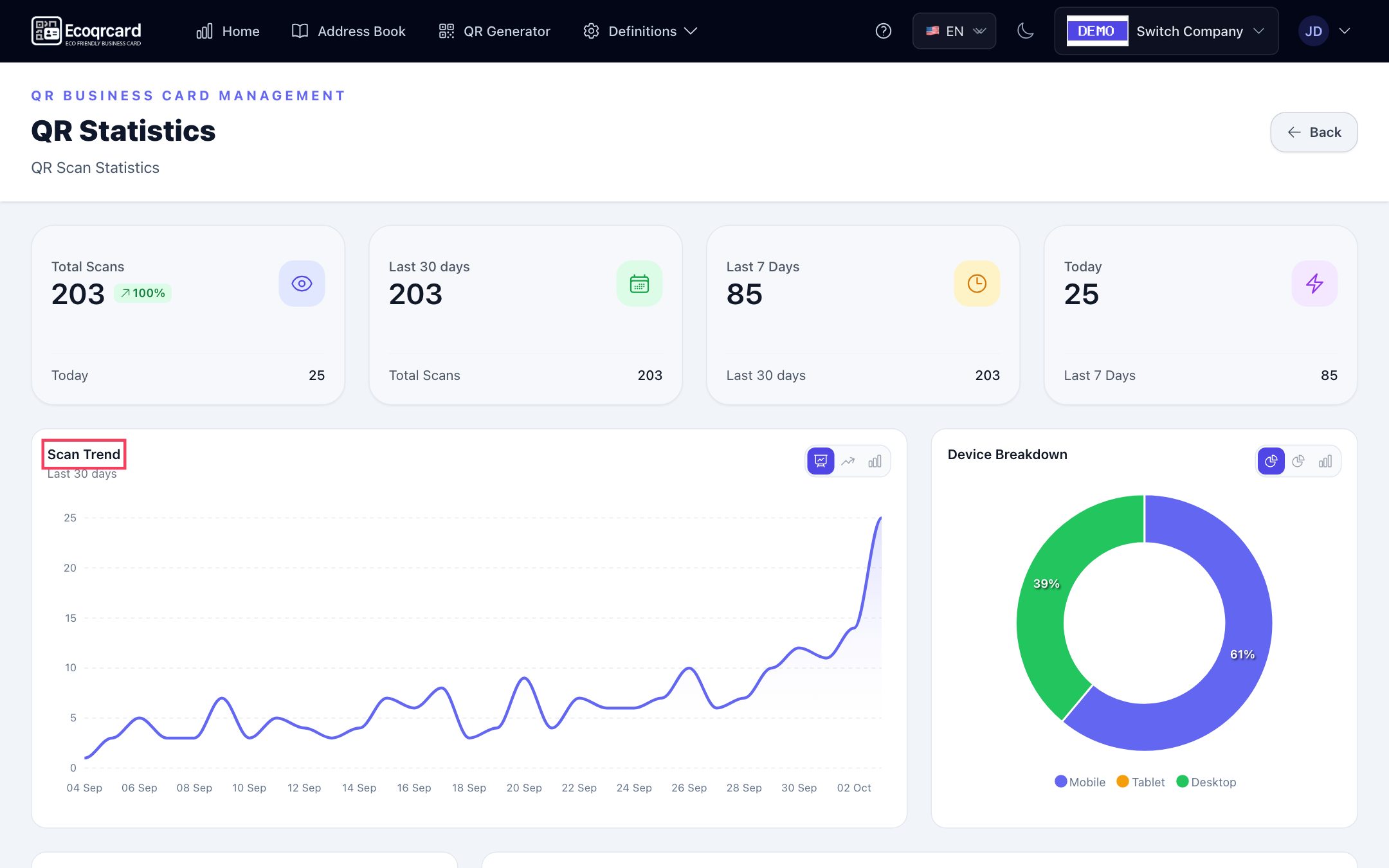
- Real-time analytics: Total scans and scans in the last 30 days, last 7 days and today; device breakdown and the most-scanned cards.
- Bulk import: Add employees in bulk with the Excel template.
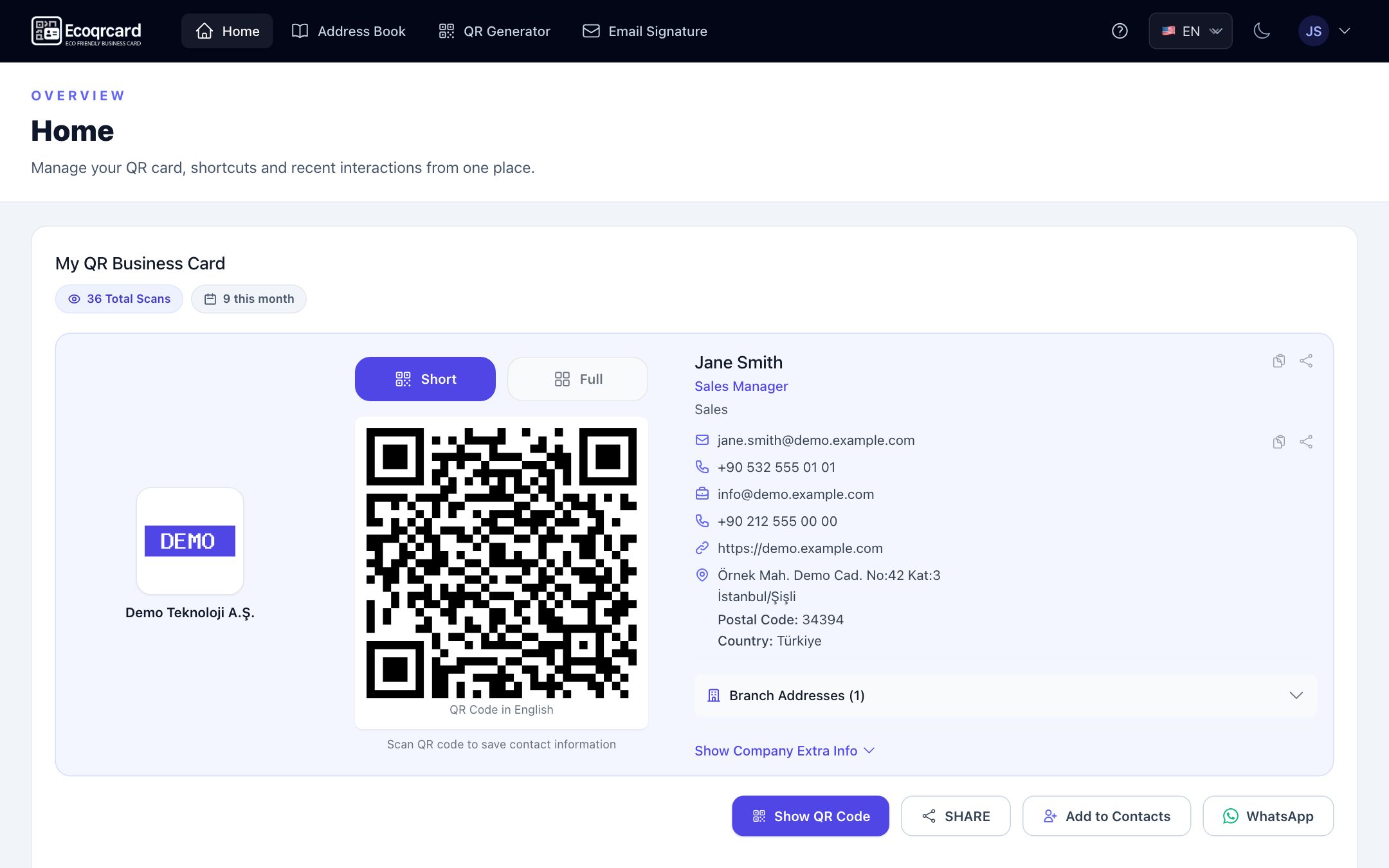
Employees see their own card on their Home page in the mobile app or in the browser, and reach their colleagues' cards through the company address book. The employee's email signature with a QR code is generated automatically from the same card details; the employee copies the signature with one click and pastes it into their email client.
Card details are edited by the company administrator, so information such as job titles and phone numbers is kept in a single source and to the company standard.
Setup steps for your company
- Enter your company details, logo and branch addresses.
- Add shared information such as social media, documents and billing details.
- Choose the card design and the fields the Short QR will share.
- Add users one by one or in bulk via Excel, and create their cards.
- Test a few cards with different phones, then share them with your employees.
If you would like to plan your move to digital business cards around the size of your company, fill in the quote request form and we will work out the right setup for your needs together. You can also browse our guides page for other topics.
Frequently Asked Questions
Does the other person need to install an app to open a digital business card?
No. The vast majority of modern smartphones read QR codes with the camera app. The card page opens in the browser, and "Add to Contacts" saves the details to the phone's own address book.
If the details on my QR business card change, do I need to reprint the code?
Not if the QR code carries the address of the card page. When you update the details, the same QR code opens the updated page. In EcoQrCard, the card is updated instantly when an employee's details change.
Will a digital business card completely replace paper business cards?
For many companies, largely yes. Even so, in some industries or formal settings you may want to keep a small number of printed cards. In that case, adding your QR code to the printed card gives you the best of both worlds.
Is a digital business card secure?
The card page shows the information you choose to share. In a business context, the basic precautions are sharing only work details, deactivating the cards of employees who leave and using an infrastructure with SSL-encrypted, secure access.
Can I see how many times the business card was scanned?
Yes, if the card page is opened through a server. In EcoQrCard, the company administrator follows company-wide scan statistics and the most-scanned cards in the dashboard, and each employee sees the total and this month's scan count for their own card on their Home page.