QR Codes
Static vs. Dynamic QR Codes: What Is the Difference?
A static QR code has its content built into the code, while a dynamic QR code carries a link you can change. We explain the differences, use cases and printing tips.
The first choice you usually face when creating a QR code is "static or dynamic?". That choice determines whether you can change the content after the code is printed, whether you can see how many times it was scanned and how complex the code will look. In this guide we explain how the two types work, which one is right in which situation and what to watch out for when printing.
How does a QR code work? A quick refresher
A QR code is a two-dimensional barcode that stores data as black and white squares (modules). The phone camera reads this pattern and decodes the data inside it. That data can be a web address, plain text, a phone number, Wi-Fi details or a contact card. The more data the code contains, the denser the pattern becomes.
QR codes have built-in error correction. There are four levels: L (about 7%), M (about 15%), Q (about 25%) and H (about 30%). These percentages indicate how much of the code can be damaged or covered while it remains readable. This feature is also what makes it possible to place a logo in the middle of the code.
What is a static QR code?
In a static QR code, the content is written directly into the code. For example, when you create a static code for a web address, the address itself is encoded in the pattern. When a phone reads the code, it goes straight to that address without any server in between.
Characteristics:
- Once printed, the content cannot be changed. If the address changes, you need to create and print a new code.
- Scans cannot be measured, because the scan never passes through a server.
- It does not depend on a server; even if the service that generated the code shuts down, the code keeps working (as long as the destination exists).
- With long content the pattern becomes dense and can be harder to read when printed small.
When is it a good fit? For permanent information that will never change: connecting directly to a Wi-Fi network, fixed text, a phone number or a simple link for personal use.
What is a dynamic QR code?
In a dynamic QR code, the pattern encodes a short redirect link rather than the content itself. When a phone reads the code, it first goes to this link; the server then sends the browser to whatever content is currently set, or shows a landing page.
Characteristics:
- The destination can be changed even after the code is printed. When the menu, catalog or campaign page changes, no reprint is needed.
- Because every scan passes through the server, scan statistics can be recorded.
- Because a short link is encoded, the pattern stays simple and is easy to read even at small sizes.
- The code can be paused temporarily and reactivated.
- It depends on the service provider; if your subscription ends or the code is deleted, the printed code stops working.
When is it a good fit? For anything printed that will stay in circulation for a long time: brochures, posters, packaging, table cards, trade show booths, business cards, catalogs and menus.
Comparison table
| Feature | Static QR | Dynamic QR |
|---|---|---|
| What is inside the code? | The content itself | A short redirect link |
| Editing after printing | Not possible | Possible, the code stays the same |
| Scan statistics | No | Yes |
| Pattern density | Increases as content gets longer | Simple |
| Internet required? | Depends on content (not for Wi-Fi or text) | Yes, for the redirect |
| Pausing temporarily | Not possible | Possible |
| Dependence on a service provider | None | Yes |
| Sharing files (PDF, image, video) | Not suitable | Suitable |
Which one should you choose, and when?
| Scenario | Recommendation | Why |
|---|---|---|
| Menu on a restaurant table | Dynamic | No reprint as prices and dishes change |
| Office guest Wi-Fi | Static (usually) | The phone connects to the network directly |
| Product packaging | Dynamic | Packaging can stay in circulation for years |
| Trade show booth and brochure | Dynamic | Scan counts to measure the event's impact |
| Employee business card | Dynamic | The code stays the same even if the job title or phone number changes |
| One-off internal text | Static | Content that will not change and does not need measuring |
For details on Wi-Fi, see our guide on creating a Wi-Fi QR code, and for the menu scenario, our guide on QR codes for restaurant menus.
What to watch out for in printing and design
- Sufficient size: Do not print the code too small on printed materials. A common rule of thumb is a side length of roughly one tenth of the scanning distance, but always test in real conditions.
- Quiet zone: Leave a blank margin around the code. The standard recommends clear space at least four modules wide.
- Contrast: Use a dark foreground on a light background. Inverted colors (light pattern on a dark background) can cause problems with some readers.
- Logo: The logo in the middle should cover only a small part of the code; an oversized logo prevents scanning.
- Call to action: Add a short line next to the code, such as "Scan to see the menu".
- Testing: Before printing, try the code with phones of different brands and ages, in different lighting conditions.
Common mistakes
- Printing a static code on a brochure that will stay in circulation for a long time, then throwing away the entire print run when the link changes.
- Deleting a dynamic code: a deleted dynamic code no longer works on printed materials. To pause it temporarily, deactivate the code instead.
- Pointing the code only to a website's homepage: take the person who scans it straight to the relevant page.
- Pointing to a page that is not mobile-friendly.
- Creating codes in personal accounts: when the employee leaves, nobody can access the codes and the printed materials are left without an owner.
What to look for in a dynamic QR service
Because dynamic codes depend on a service provider, choosing the provider matters as much as the code itself. Especially for long-lived print such as packaging, signage or catalogs, check the following:
- Continuity: Do the codes work without interruption for the length of your subscription? Can you pause a code temporarily without deleting it?
- Management: Are the codes scattered across personal accounts, or managed company-wide from one dashboard? Access to the codes should not be lost when an employee leaves.
- Permissions: Can you control who may edit which code? A user accidentally changing someone else's code can cause serious problems on printed materials.
- Landing page: Is the page that opens when the code is scanned mobile-friendly and in line with your brand?
- Statistics: Can you see scan counts by day, week and month?
- File support: If you plan to share PDFs, images or videos, does the file size limit meet your needs?
- Security: Are the links SSL-encrypted?
Static and dynamic QR codes with the EcoQrCard QR Generator
The EcoQrCard QR Generator lets companies create QR codes with their logo for any purpose and manage them all in one place. When you create a code, you choose Dynamic or Static at the top of the form.
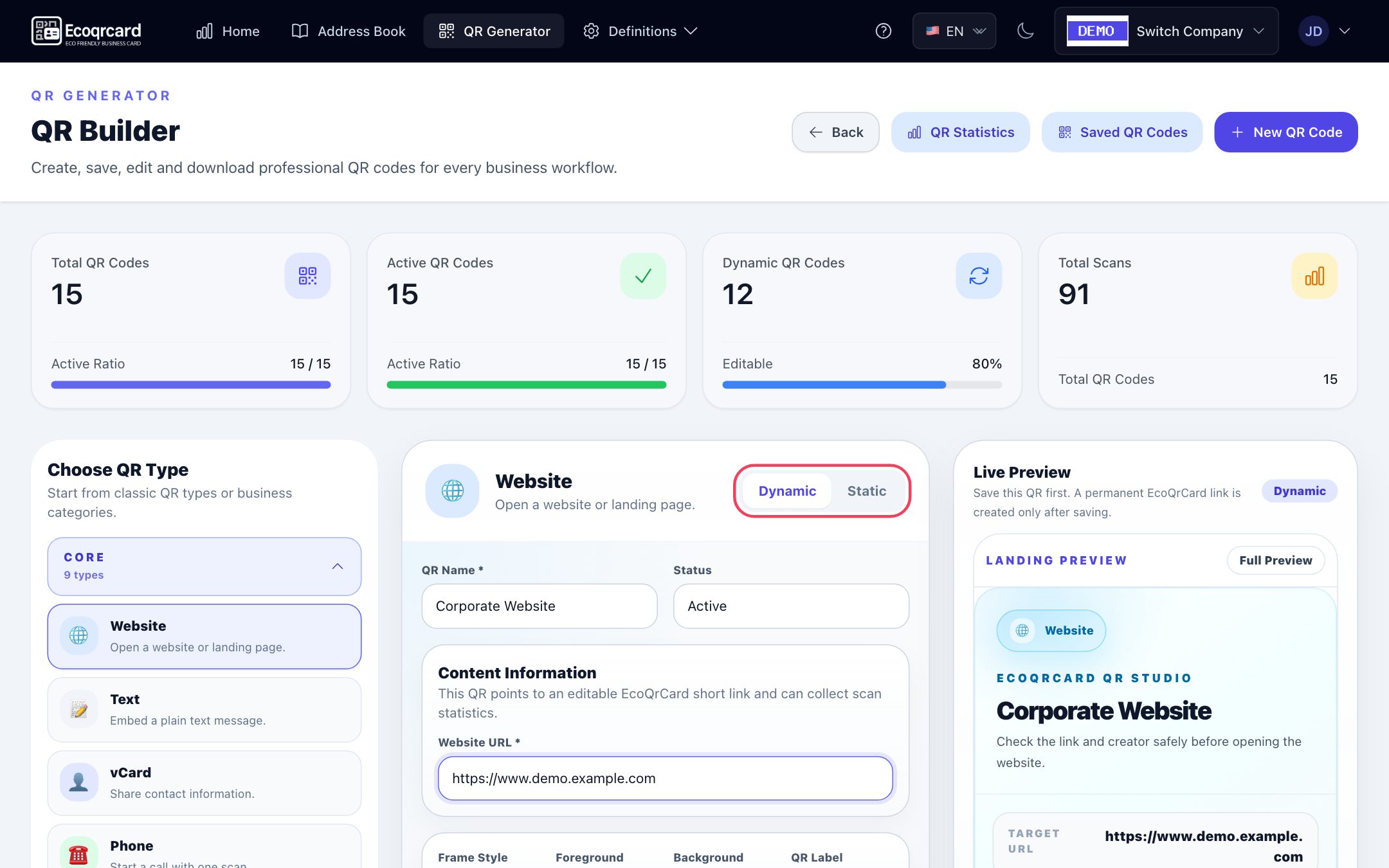
- 25+ QR types: Website, text, vCard, phone, SMS, email, WhatsApp, Wi-Fi, location, PDF, image, video, social media, multi-link, payment, survey, feedback, restaurant menu, event, coupon and more.
- Editable dynamic codes: The code stays the same even when the content changes. PDF, image, video, multi-link and document hub types work in dynamic mode only; files of up to 50 MB can be uploaded.
- Landing page: When a dynamic code is scanned, a mobile-friendly landing page with your company name and logo opens first; from there, the visitor reaches the content (website, menu, file and so on) with one tap. A static code opens the content directly.
- Draft / active: You can pause a dynamic code temporarily without deleting it. Deleted codes cannot be restored, so use Draft rather than deleting codes that are in print.
- Logo and design: Center logo, colors, frame and label. Codes are generated with the highest error correction level (H), which helps keep them readable despite the logo in the middle.
- Sharing: The branded image for print is downloaded with the PNG button below the preview on the form; the Show & Share QR window lets you download a plain QR image, copy the link and send it via WhatsApp or email.
- Visibility and permissions: You can make a code visible to the whole company or keep it private to you. Employees can see and download colleagues' company-visible codes but cannot edit them; codes are not scattered across personal accounts, and the company administrator can manage all of them.
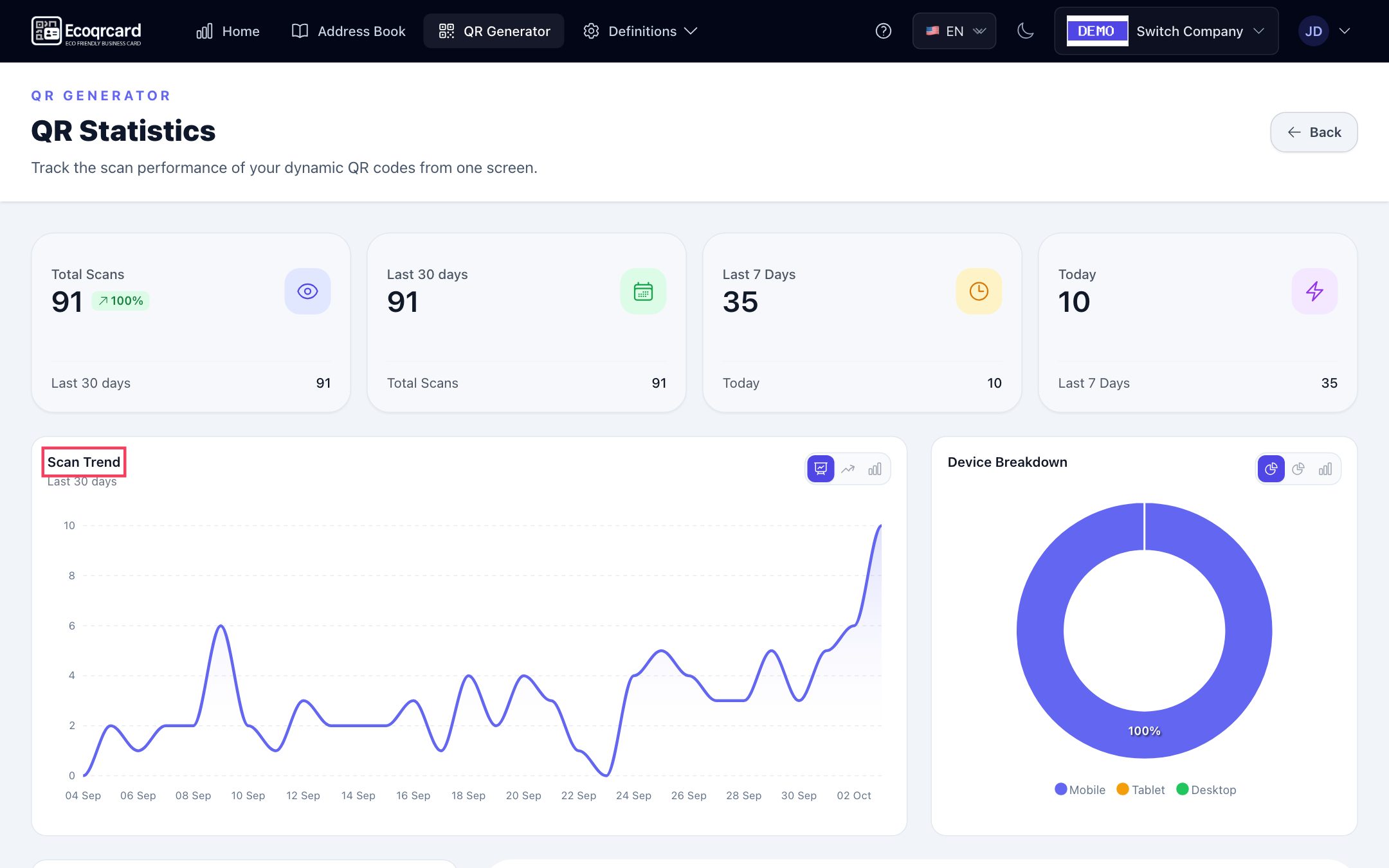
Scans of dynamic codes are collected on the statistics page: total scans and scans in the last 30 days, last 7 days and today, the scan trend, device breakdown and the most-scanned codes.
The same dynamic logic is used in employees' digital business cards: when details change, the QR code stays the same and the card is updated.
If you would like to manage your company's printed materials with dynamic QR codes, fill in the quote request form and we will look at your use cases together.
Frequently Asked Questions
Can I convert a static QR code to a dynamic one later?
No. The content of a static code is built into the pattern, so it cannot be changed. If you want dynamic features, you need to create a new dynamic code and use that on your printed materials.
Do dynamic QR codes expire?
A dynamic code works as long as the service that manages it is running and the code is active. If you delete the code or stop using the service, the printed code no longer redirects to its destination. That is why choosing a reliable provider matters for long-term print.
Can I see how many times a static QR code was scanned?
No. A static code does not pass through any server when scanned, so it cannot be counted. If you want to see scan counts, use a dynamic code.
Does putting a logo in the middle of a QR code stop it from scanning?
Generally not, as long as the logo is a reasonable size; the error correction built into QR codes makes this possible. Even so, always test a code with a logo on different phones before printing.
Which QR types can only be dynamic?
Types that require file hosting or a landing page, such as PDF, image, video and pages that bring several links together, have to be dynamic. In EcoQrCard, the static option is disabled for these types.