Digital Business Cards
Digital Business Cards and QR Codes for Real Estate Agents
A step-by-step look at how real estate agents can use digital business cards and QR codes on signs, in brochures, at viewings and in client follow-up.
In real estate, trust starts with the first contact. A buyer walking past a for-sale sign, a homeowner looking for an agent or a tenant leaving a viewing should all be able to reach the agent easily. Digital business cards and QR codes turn those moments of contact into opportunities that aren't missed. This guide explains how real estate agents and agencies can use digital business cards and QR codes in the field.
Why business cards matter so much in real estate
Real estate is a relationship business. Someone viewing homes today may decide a few months from now; someone selling their property today may be looking for a new one years later. Over that long cycle, having your correct, up-to-date contact details saved in the client's phone makes a big difference.
Paper business cards have a few problems here:
- A card handed over at a viewing gets lost among the brochures.
- When an agent changes office or phone number, old cards send people to the wrong place.
- Clients don't type details into their contacts by hand; they often take a photo of the card and forget about it.
- There's no way to measure whether the card actually works.
A digital business card lets clients save your details to their contacts with a single tap and always stays up to date.
Where real estate agents can use QR codes
| Where? | What should the QR code open? | Tip |
|---|---|---|
| For-sale / to-let sign | The listing page or listing brochure | Write "Scan for listing details" next to the code |
| Listing brochure and flyer | The agent's digital business card or listing video | Place the code in a bottom corner of the page, at an adequate size |
| End of a viewing | The agent's digital business card | Show it on your phone screen |
| Office window | The agency's current portfolio page | Use a dynamic code so the printed code stays the same as the content changes |
| Open house | Visitor information form or feedback survey | Keep the form short |
| Email signature | The agent's digital business card | Reminds people of your contact details in every message |
What to watch for on signs and windows
Signs are usually seen from a few metres away. Print the QR code large enough to be scanned from where people will stand; a very small code is useless on a sign. For print size, see our QR code print size guide. Also avoid shiny, reflective materials and test the code in direct sunlight.
Why a dynamic QR code?
In real estate, content changes fast: the price is updated, the property sells, new photos are added. If you print a static QR code, you have to reprint the sign whenever the content changes. With a dynamic QR code, the content the code points to is updated from the panel and the printed code stays the same. When a property sells, you can reuse the sign for another listing. We explain the difference between the two types in detail in our guide to static vs dynamic QR codes.
After the viewing: follow-up
The most critical moment of a viewing is walking out of the door. At that point:
- Share your business card: Show the QR code on your phone so the client saves your details to their contacts right away.
- Send the link by message: After the meeting, send your card link and the listing details in a short message.
- Ask for feedback: Send the client a short form with two or three questions about what they thought of the property. This information is valuable both for reporting to the owner and for suggesting the right properties.
- Take notes: Jot down short notes on the client's budget, expectations and objections.
A note on personal data
If you collect names, phone numbers or email addresses from visitors, explain why you are collecting them and comply with the applicable data protection legislation, such as the GDPR. Sending marketing SMS or emails may also require separate consent under electronic marketing rules. Consult your legal adviser for details; this section is not legal advice.
What should the page behind a listing code include?
If someone who scans the code on a sign or brochure can't find what they're looking for within a few seconds, they close the page. When preparing the listing page or brochure, put this information up front:
- Key facts: Information that affects the decision, such as price, floor area, number of rooms, floor, age of the building and service charges.
- Images: Clear photos taken in daylight; a short video tour if possible.
- Location: The property's position on a map and nearby points of interest.
- How to reach the agent: Phone, WhatsApp and a link to the digital business card.
- Current status: If the property has been sold or let, say so clearly or point to similar listings.
It's also important that the page loads quickly on a phone. Very large files and heavy pages keep someone connected over mobile data in front of the sign waiting.
Checklist for an agent's daily routine
- Show your business card QR code at the end of every viewing.
- Send your card link and listing details by message on the same day as the meeting.
- Make sure your email signature includes your current business card code.
- Update the codes for sold or let properties on the same day.
- Check the scan counts of your listing codes once a week.
For agencies: managing the team
In agencies with several agents, a common standard for business cards makes the office look professional:
- Shared design: All agents' cards carry the same logo, colours and layout.
- Shared information: The office address, website and social media accounts are entered once and reflected on every card.
- Agent changes: A departing agent's card is switched off; when the code is scanned, that person's details are no longer shown. A deactivated card does not automatically redirect the client to another agent, so include the agency's general contact details on signs and brochures too.
- Measurement: You can see which cards and which listing codes are scanned most.
Common mistakes
- Printing a static QR code on a sign: When the listing changes, the code becomes useless.
- Not saying what the code opens: "Scan me" isn't enough; tell people what they'll find.
- Linking to pages that aren't mobile-friendly: Almost everyone scanning the code is on a phone.
- Mixing personal and agency details: Clients should be able to reach both the agent and the agency.
- Putting off follow-up: The first day after a viewing is when interest is highest.
Digitise your real estate agency with EcoQrCard
In EcoQrCard, the company administrator creates a digital business card for each agent. Alongside the agent's name, job title and contact details, the card shows the agency logo, address, website, social media accounts and document links. Visitors save the details to their phone with Add to Contacts. Agency details are entered once and reflected on all agents' cards, and the card design is shared company-wide. When an agent's details change, the card updates instantly and the QR code stays the same.
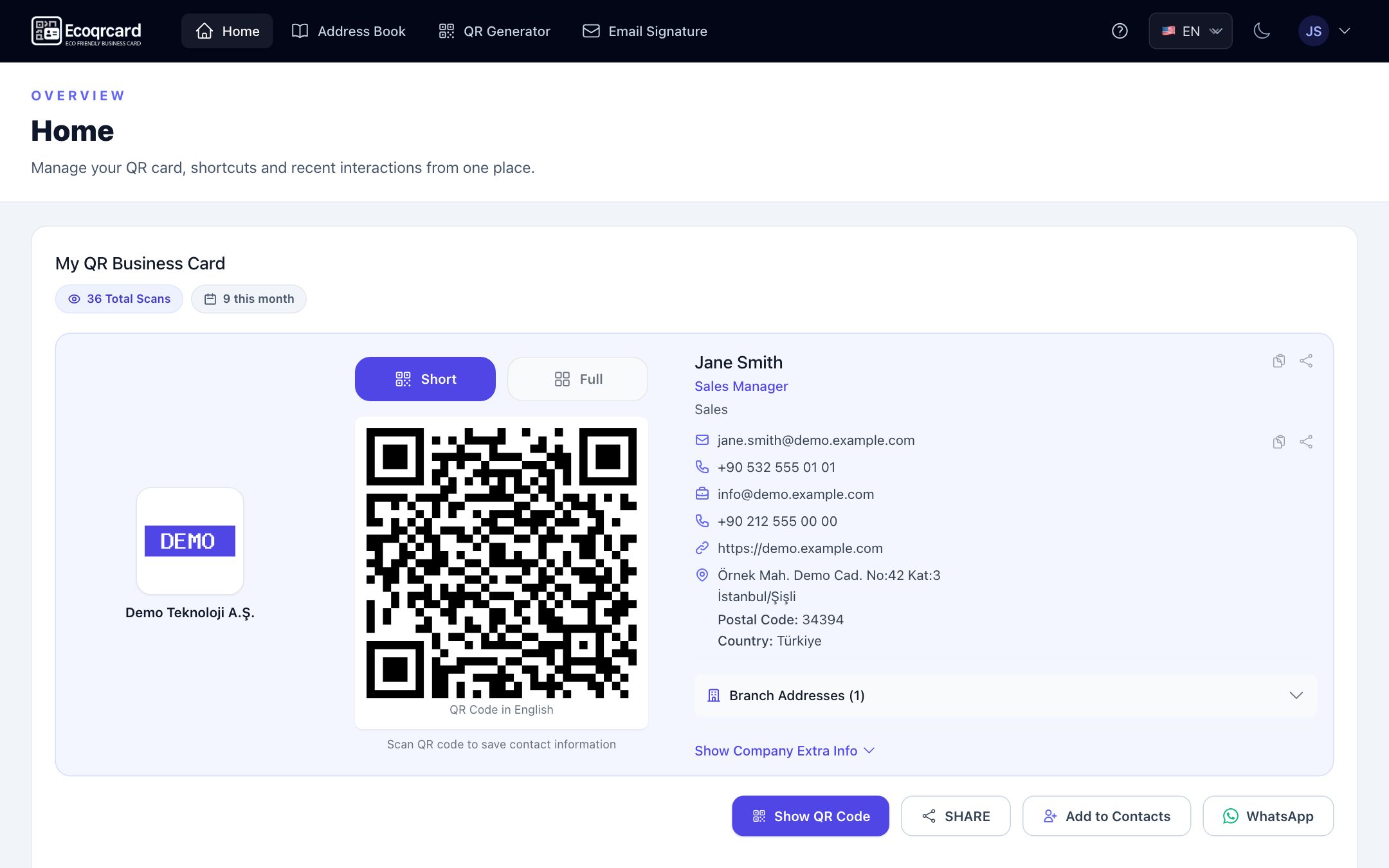
Agents open their card in the mobile app and show the QR code or send the link via WhatsApp. For agencies working with international clients, agents can choose the card language when showing or sharing the code: Turkish, English, Azerbaijani, Russian or German.
For listings, you use the QR Generator. Agency managers and agents can create QR codes of type website for the listing page, PDF for the listing brochure, video for a property tour, image for photos, location for where the property is, or multi-link to bring several links together. PDF, video and image files (up to 50 MB) are uploaded directly. Choose Dynamic mode for signs and brochures: when a property sells or a listing changes, you point the code to new content with Edit, and the printed code stays the same.
For a print image with your logo and colours, open the code in the edit screen and download it with the PNG button under the Live Preview; this image includes the colours and frame you chose and the agency logo in the centre. Download QR in the share window, by contrast, gives you a plain black-and-white code.
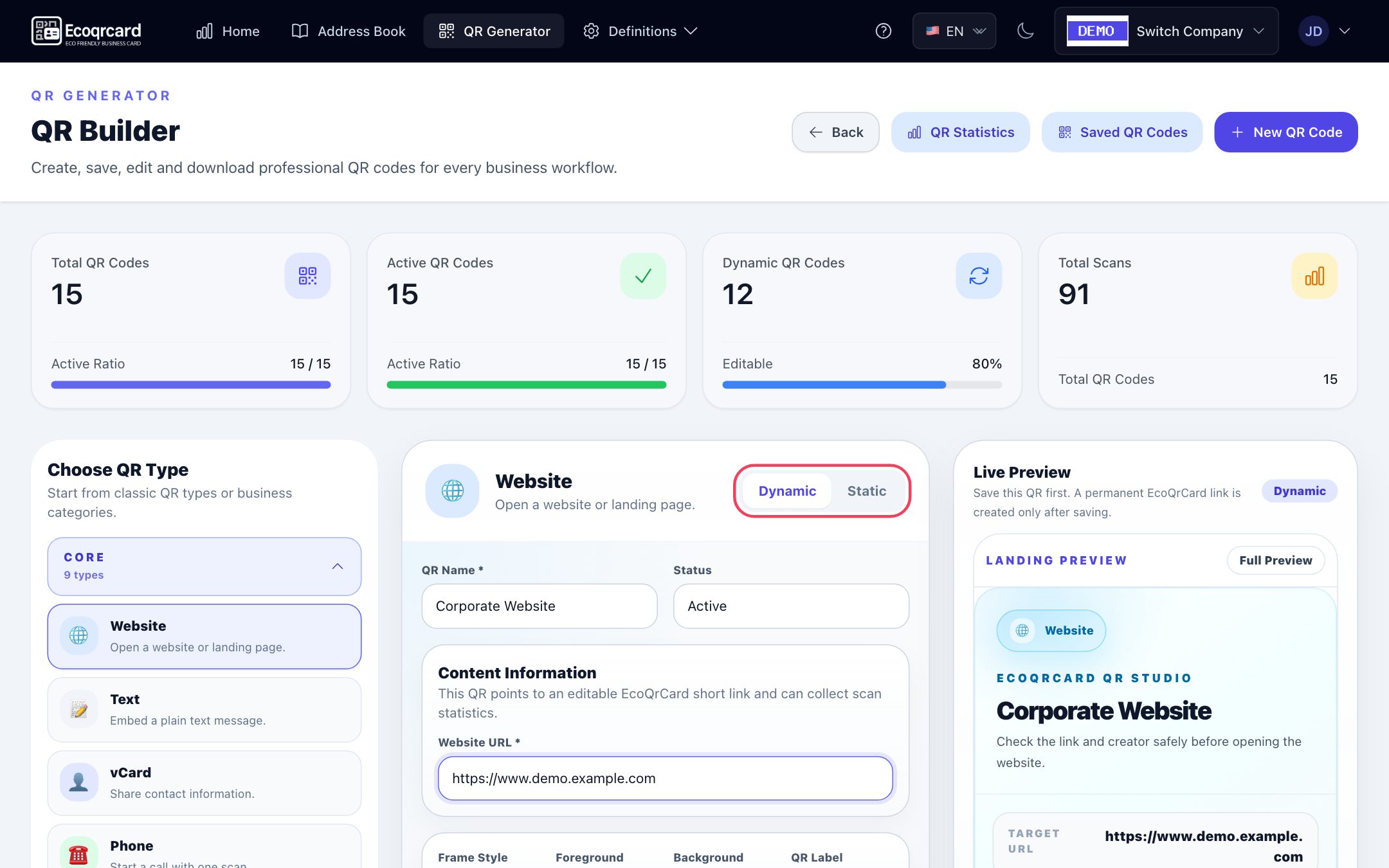
The saved QR codes list shows the scan count of each dynamic code; the QR Statistics page shows total, last 30 days, last 7 days and today's scans, the scan trend and the most scanned codes. This lets you see which sign or brochure attracts interest. Giving each listing its own code makes comparison easier; scans of static codes are not counted. For post-viewing feedback, you can also build a short form with the survey system and share it via a link or QR code.
To manage your agents' business cards and listing codes from a single panel, fill in the quote request form and we will work out the right solution for the size of your agency together.
Frequently Asked Questions
What should the QR code on a for-sale sign open?
The best option is to open that property's listing or brochure directly. Someone who sees the sign first wants information about the property; they can reach the agent's business card from the listing page or brochure. If you use a dynamic code, you can change the content when the property sells.
Should I create a separate QR code for each listing?
Using a listing-specific code on signs and brochures lets you measure which listing attracts interest. Your business card, on the other hand, is a single code that stays the same across all listings.
Do digital business cards work without an internet connection?
The client's phone needs an internet connection to open the card. Once the card has been saved to contacts, though, the details stay on the phone and don't need the internet.
What happens to client relationships if an agent leaves the agency?
The agency manager deactivates the agent's card; it no longer opens when scanned. Listing codes created in the QR Generator, however, keep working even if the agent's account is closed; the company administrator can see and edit them. This means you can point the listing codes to another agent's details or to the agency's general page.
How big should a QR code be on a property brochure?
As a general rule, the further away the code will be scanned from, the larger it needs to be. A code a few centimetres wide is enough on a hand-held brochure, while a sign needs a much larger one. Before printing, test the code with different phones from the real distance.