
Surveys
How to Run an Employee Engagement Survey
How to plan an employee engagement survey, take an approach to anonymity that builds trust, choose question themes and frequency, and turn the results into action.
Understanding how engaged employees are with their work and the company is one of the most important questions for HR teams and managers. An employee engagement survey gives a regular, comparable answer to that question and, when done well, shows employees that their voice is heard. This guide walks through every step, from planning the survey to turning the results into action, with sample question themes.
What is employee engagement?
Employee engagement describes the emotional and mental commitment an employee feels towards their work, their team and the company's goals. Engagement is more than satisfaction: a satisfied employee has no complaints about their current conditions, while an engaged employee puts in extra effort, cares about the company's success and plans to stay for the long term.
An engagement survey helps answer questions such as:
- How do employees feel about their work and their teams?
- Which departments or teams have problem areas?
- How are management practices, career opportunities and communication perceived?
- What has improved and what has got worse since the last measurement?
Step 1: Define the purpose and scope
Before the survey, be clear about what you want to learn. Are you taking a general pulse, or do you want to understand the impact of a specific change (a new working model, a reorganisation)? Once the purpose is clear, the questions become clear too.
Define the scope as well: the whole company, or specific departments? Which breakdowns (department, location, length of service) do you want to see the results in? Breakdowns should be chosen carefully, because they affect anonymity.
Step 2: Anonymity and trust
The most critical issue in an engagement survey is trust. If employees worry that their answers will be used against them, they won't answer honestly.
- Use an anonymous survey: Surveys that don't collect identifying information bring more candid answers.
- Explain the anonymity clearly: At the start of the survey, state in plain language that answers will not be linked to anyone.
- Don't break out small groups: Showing the results of a team of three or four separately can effectively remove anonymity.
- Take care with open-ended questions: Remind people that they might write details that identify them.
- Don't ask for personal data unnecessarily: Only ask for demographic information that is genuinely needed for the analysis.
Step 3: Choose the question themes
Engagement surveys are usually built around a few main themes. The themes and questions below are general examples; adapt them to your own company culture.
| Theme | Sample statement |
|---|---|
| Meaningful work | "I believe my work contributes to the company's goals." |
| Relationship with manager | "My manager gives me regular, constructive feedback." |
| Development | "I have opportunities to learn new skills at this company." |
| Recognition | "When I do a good job, it gets noticed." |
| Communication | "I hear about important developments in the company in good time." |
| Workload and balance | "My workload is at a reasonable level." |
| Team | "In my team, we support one another." |
| Future | "I would like to still be working at this company a year from now." |
Choosing a scale
Statements like these usually use a 5-point agreement scale, from "Strongly disagree" to "Strongly agree". Using the same scale throughout the survey makes the results easier to compare. Matrix questions are a practical way to group similar statements in a single table.
Open-ended questions
One or two open-ended questions help you understand the reasons behind the numbers:
- "What do you like most about working at our company?"
- "If you could change one thing, what would you change first?"
If you want to measure employees' willingness to recommend the company, you can also add an NPS-style question; for details, see our guide what is NPS.
Length
A comprehensive annual survey can have 15–30 questions; interim pulse surveys should be limited to 5–10 questions. State up front how long the survey will take to complete.
Step 4: How often to survey
| Approach | Frequency | When is it suitable? |
|---|---|---|
| Comprehensive engagement survey | Once a year | In-depth measurement and annual planning |
| Pulse survey | Quarterly or more often | Closely tracking change |
| Event-driven survey | As needed | After a reorganisation or a new policy |
Set the survey frequency according to how quickly you can act on the results. Frequent surveys whose results are never shared leave employees thinking "nothing changes anyway".
How do you write a good question?
The wording of the questions directly determines the quality of the answers. When writing them, pay attention to the following:
- Ask about one thing at a time: Statements that combine two topics, such as "My manager supports me and keeps me well informed", make it unclear which topic is being rated.
- Don't lead: Avoid wording that expects a positive answer, such as "Are you happy with our wonderful team?"
- Use plain language: Write sentences that everyone will understand the same way, without abbreviations or business jargon.
- Balance positive and negative statements: If all questions point in the same direction, careless answers can increase.
- Make it actionable: Don't ask questions whose results you can't act on.
Before publishing the survey, run a small test with a few employees from different departments; fix any questions that are unclear or misunderstood at this stage.
Step 5: Announce it and boost participation
- Announce the survey with a short message from senior management explaining its purpose and the anonymity.
- Give people time during working hours to complete it.
- For teams that don't work at a desk, put up the QR code in common areas.
- State the end date clearly and send a short reminder near the deadline. Because you don't know who has responded in an anonymous survey, send the same reminder to everyone.
Step 6: Share the results and take action
The real value of the survey shows in what happens afterwards.
- Summarise the results: Identify strengths and areas for development.
- Share them with employees: Present the overall results openly and honestly.
- Choose priorities: Pick two or three concrete areas instead of trying to fix everything at once.
- Prepare an action plan: Set an owner and a date for each action.
- Track progress: Look at the change in these areas in the next measurement.
Common mistakes
- Promising anonymity but collecting identifying information
- Preparing very long, repetitive questions
- Sharing results only with management
- Reacting defensively to negative results
- Running a survey and taking no action
Employee engagement surveys with EcoQrCard
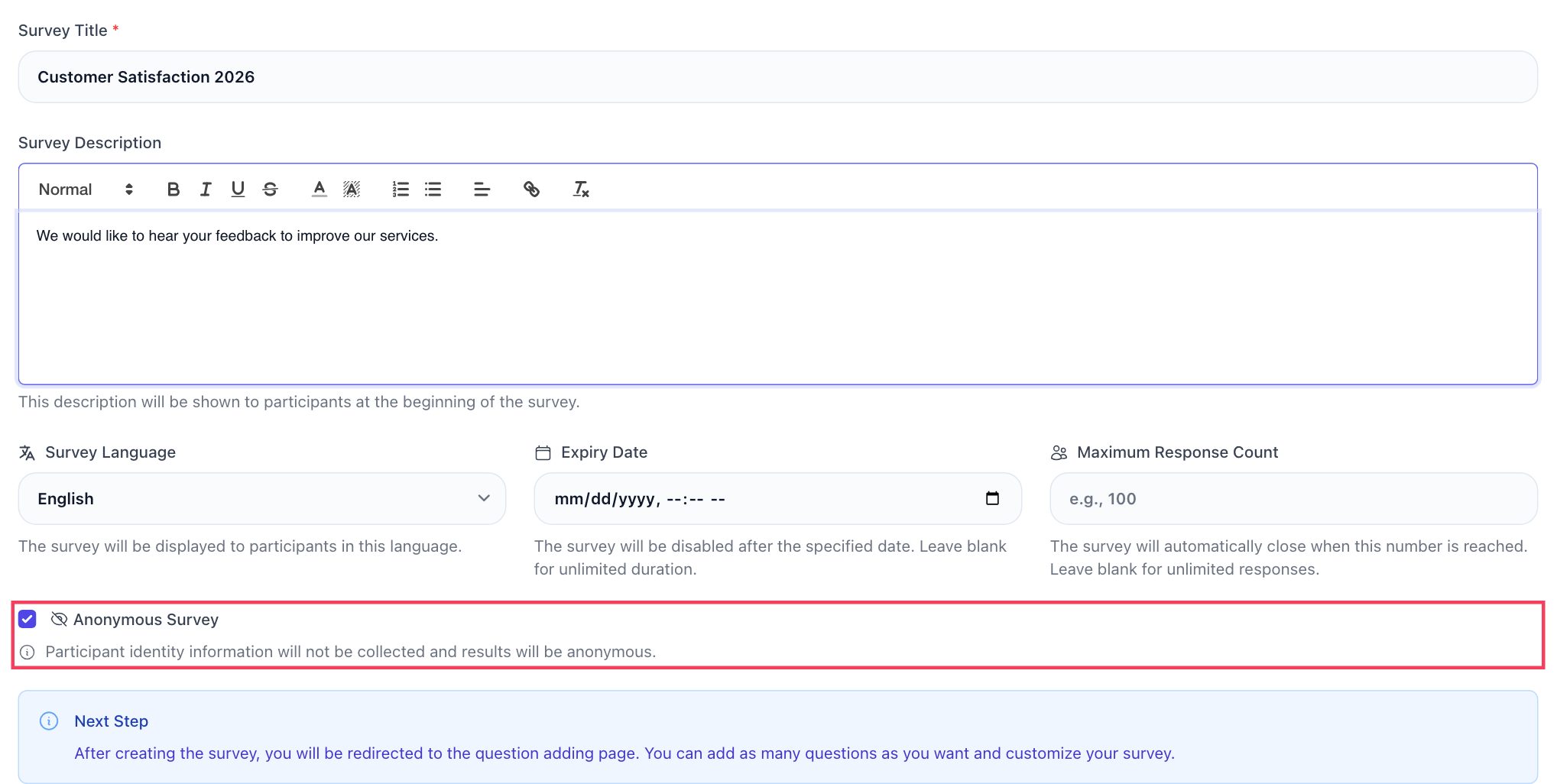
EcoQrCard's survey system makes it easy to manage employee surveys within the company. When you create a new survey, the Anonymous Survey option is ticked by default; in that case participants are not asked for identifying information, no IP address or browser information is stored with the responses, and responses appear in the results as "Anonymous #number". In a non-anonymous survey, participants enter their email address before they start; don't switch this option off in a survey where you have promised anonymity.
With the drag-and-drop editor you can add section headers, page breaks, rating, multiple choice, matrix and open-ended questions, and set an end date. The most practical way to build a 5-point agreement scale is the Matrix question: you enter the statements as rows and the five options from "Strongly disagree" to "Strongly agree" as columns. For a single general question, a Rating question with a 1–5 range also works. If you don't want to start from scratch, you can pick one of more than 650 ready-made templates in over 20 categories and edit it.
The language of each survey's participation page (Turkish, English, Azerbaijani, Russian or German) is chosen separately. For teams in different countries, you can copy the survey with Duplicate, translate the questions into the relevant language and publish separate versions; the results of each version are then tracked separately.
You can share the survey via a link or QR code, or send invitations to a participant list uploaded from Excel through your company's mail server (this requires the company administrator to have configured the SMTP settings). In anonymous surveys, whether invited people have responded is not recorded, which protects anonymity. Because anyone with the link can take part in an anonymous survey, share the link only on internal channels.
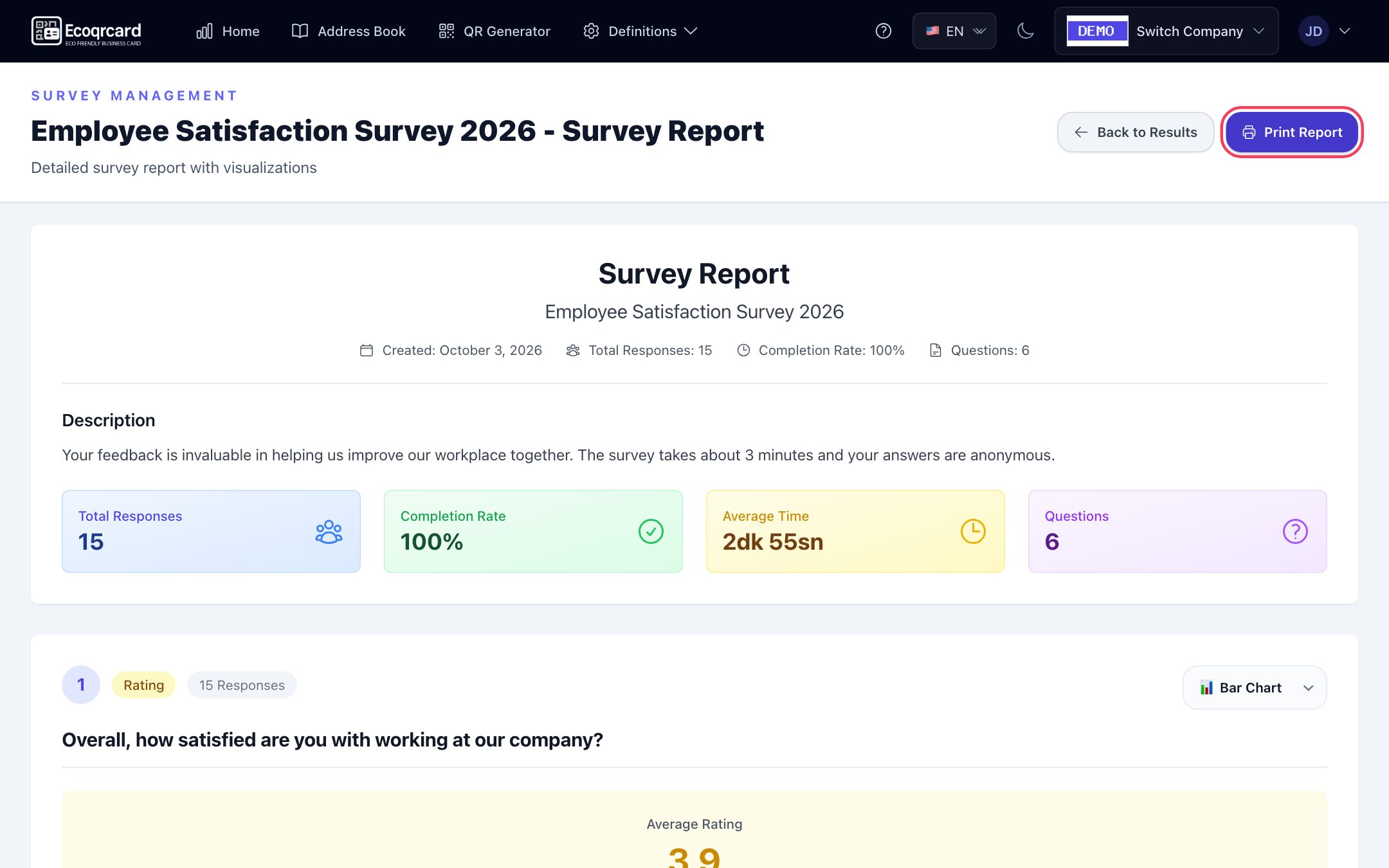
The results screen shows charts for each question, the completion rate and a timeline of responses. You can explore open-ended answers with a word cloud and turn all the results into a printable report to save as a PDF.
Survey permissions are granted per user; for example, you can give the HR team permission to create surveys and view results while keeping other employees as participants only. Bear in mind that permissions apply company-wide, not per survey: a user with the View Results permission can see the results of all the company's surveys. If only HR should see the engagement survey results, grant this permission to a narrow group. Your employees' digital business cards and the internal Address Book are managed in the same panel.
To start measuring employee engagement regularly, fill in the quote request form and we will plan a setup that fits your needs.
Frequently Asked Questions
Can an employee engagement survey really be anonymous?
Yes. If the survey is set up so that it doesn't collect identifying information, responses are not linked to individuals. In EcoQrCard's anonymous surveys, participants are not asked for an email address and no IP address or browser information is stored with the responses. However, showing results for very small groups separately or asking demographic questions that identify people can weaken anonymity, so take care with these points.
How many questions should the survey have?
15–30 questions for comprehensive annual surveys and 5–10 questions for interim pulse surveys are usually enough. As the number of questions increases, answer quality and completion rates can drop.
How often should the survey be run?
A common approach is one comprehensive survey a year with shorter pulse surveys in between. Set the frequency according to how quickly you can act on the results.
How can I increase the participation rate?
Explain the survey's purpose and anonymity clearly, give people time during working hours, keep the survey short and share what was done in response to previous surveys. Participation rises when employees see that their answers lead to change.
What should I do if the results are negative?
Negative results are the most valuable information for improvement. Share them without getting defensive, pick two or three priority areas and announce a concrete action plan. Track the change in these areas in the next measurement.