Digital Transformation
The Paperless Office and Sustainability: Practical Steps
Where to start reducing paper consumption, which processes are easy to digitise and how to measure progress honestly instead of with inflated claims.
The "paperless office" has been talked about for decades, yet in most companies the printers are still running, business cards are still ordered by the box and forms are still filled in by hand. The reason is usually not reluctance but uncertainty about where to begin. Rather than banning paper overnight, this guide offers a practical roadmap that starts with the processes that use the most paper and are easiest to digitise. The aim is both to reduce environmental impact and to speed up work.
Why does a paperless office matter?
The benefits of using less paper are not only environmental:
- Environment: Less paper means fewer trees and less water, energy, ink and waste. Transporting and disposing of printed materials adds a further burden.
- Cost: Paper, toner, printer maintenance, print orders and archive space are hidden but ongoing expenses.
- Speed: A digital form reaches head office instantly; a paper form sits on someone's desk.
- Being up to date: A printed document starts going out of date the moment it is printed. Digital content is updated in one place.
- Access: Remote and hybrid teams can't reach paper, but they can reach a digital document from anywhere.
- Corporate reputation: Sustainability goals are becoming an increasingly visible criterion for customers, employees and business partners.
Start by seeing where you are: a simple paper inventory
You can't improve what you don't measure. For one month, collect answers to these questions:
- Which department prints the most?
- What is regularly ordered from the printer? (business cards, brochures, catalogues, forms, letterhead)
- Which forms are still filled in on paper? (leave requests, visitor log, satisfaction forms, fault reports)
- Which documents are printed and then scanned?
- Which printed lists constantly need updating? (internal phone list, organisation chart)
This inventory shows which step will have the biggest impact and becomes a baseline for measuring progress later.
Processes that are easy to digitise
| Paper process | Digital equivalent | Difficulty |
|---|---|---|
| Printed business cards | Digital business card with QR code | Low |
| Correspondence on letterhead | Corporate email signature and PDF | Low |
| Suggestion box, paper surveys | Online survey via QR code | Low |
| Printed internal phone list | Digital company directory | Low |
| Printed catalogues and brochures | PDF opened from a QR code | Medium |
| Restaurant menus | QR menu | Low |
| Guest Wi-Fi password cards | Wi-Fi QR code | Low |
| Approval processes requiring wet signatures | Electronic approval and signature systems | High (legal review needed) |
| Physical archive | Document management system | High |
The steps at the top of the table are quick wins: easy to set up, quick for employees to get used to, with visible results. Areas such as wet signatures and archiving involve legal retention obligations, so you need to proceed together with your legal and accounting advisers.
Step-by-step roadmap
- Start with quick wins. Put processes that affect every employee but aren't complex first, such as business cards, email signatures and the internal directory.
- Appoint an owner. If the paperless office stays "everyone's job", it becomes nobody's job. Name a coordinator or a small team.
- Change the default. Make double-sided printing the default, make screen sharing standard in meetings and design new forms as digital-only.
- Make the alternative easy. Employees usually choose paper not out of habit but because the digital route is more of a hassle. QR codes, shared folders and mobile access reduce that hassle.
- Train and explain. Explain why you are making the change; a short guide or internal announcement makes a big difference.
- Measure and share. Every quarter, compare print orders, paper purchases and print counts with your baseline inventory.
Small tips for everyday habits
Small habits make as much difference as big projects:
- Share meeting agendas and presentations before the meeting instead of printing them; put a screen or projector in the meeting room.
- Enable card or PIN release printing; fewer printouts are left forgotten on the printer.
- Use QR codes instead of printed sheets for guest Wi-Fi details, menus and notices.
- Circulate invoices and draft contracts as PDFs.
- Prepare onboarding packs for new employees digitally, so they build digital habits from day one.
Be honest when measuring
The biggest risk in sustainability communication is inflated claims. Figures of unclear origin such as "we saved this many trees" or "we cut this many tonnes of carbon" erode trust. Instead, use data you can measure directly:
- The number of business cards and brochures ordered from the printer
- The number of reams of paper purchased
- Page counts from printer meters
- The number of forms filled in digitally instead of on paper
Example calculation (hypothetical): If each member of a 40-person sales team uses two boxes of business cards a year (100 cards per box), annual consumption is 8,000 business cards. When the team switches to digital business cards, this order largely disappears; and so do the old boxes thrown away whenever a job title or phone number changes. The figures in this example only illustrate the calculation method; do the calculation with your own company's order records.
If you want to convert savings into carbon or water figures, state the source of the factors you use clearly.
Apply the same principle when sharing results: a verifiable statement such as "This year's business card orders were significantly lower than last year's" is far more credible than a large but unsourced environmental figure, and it can easily be defended in your sustainability reports.
Common mistakes
- Trying to digitise everything at once and wearing the team out
- Banning paper without preparing a digital alternative
- Designing processes that still require digital documents to be printed
- Moving documents with legal retention requirements to digital without seeking advice
- Communicating with environmental figures that have no source
Steps towards a paperless office with EcoQrCard
EcoQrCard covers most of the "quick win" rows in the table above on a single platform: it moves the materials companies print most often, and which go out of date fastest, into digital form.
| Paper habit | EcoQrCard equivalent | What you gain |
|---|---|---|
| Boxes of business cards | A digital business card with a QR code for every employee | No reprinting when a job title or phone number changes; the card updates instantly, opens in five languages and saves to contacts with one tap |
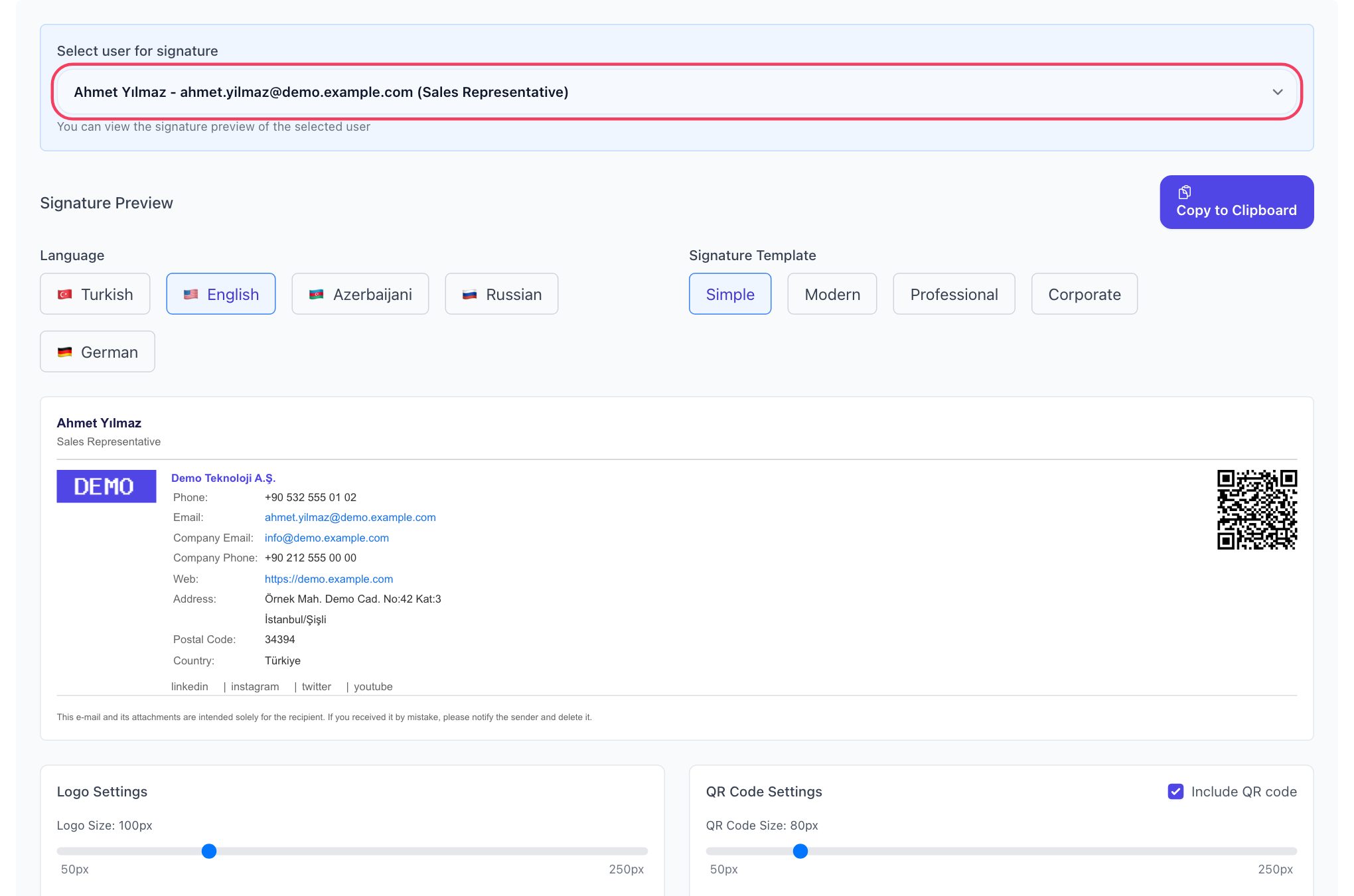
| Letterhead, hand-made signatures | Company-wide email signature | A consistent signature with a QR code and legal disclaimer; every email works as a business card |
| Paper satisfaction forms, suggestion boxes | Surveys opened via QR code | Responses are reported with charts; no more collecting paper and counting by hand |
| Printed internal phone list | Address Book | An up-to-date company directory with search and filters; export to Excel when needed |
| Printed catalogues, price lists, manuals | Upload a PDF in the QR Generator and share it with a dynamic code | The printed code stays the same even when the file changes; you can see how often it is opened |
| Wi-Fi password cards, printed menus | Wi-Fi and restaurant menu types in the QR Generator | Less need for printed password cards and paper menus; with dynamic codes, content is updated in one place |
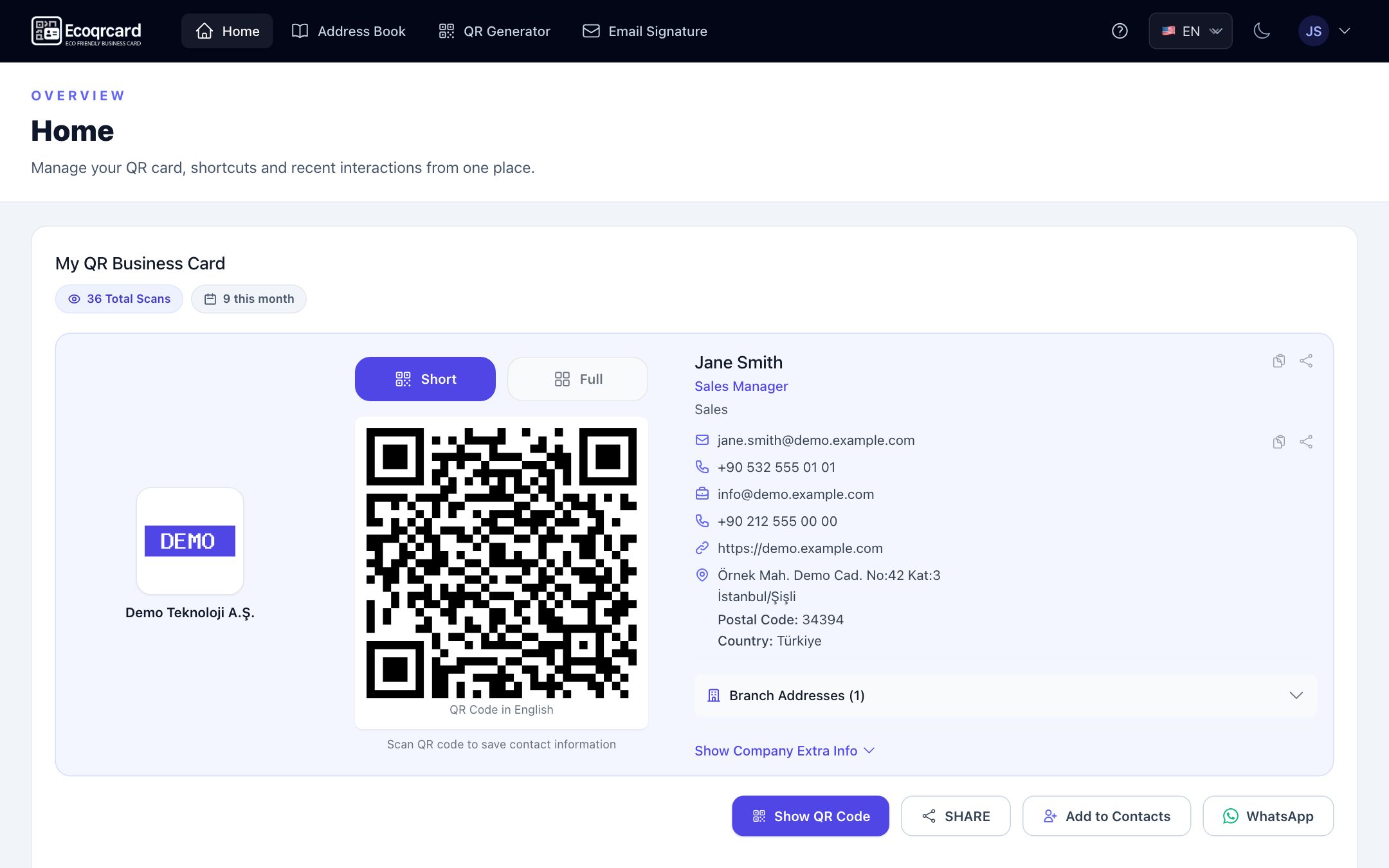
The switch takes just a few steps: the administrator enters the company details and logo once, imports users one by one or in bulk with the Excel template, then creates the employees' business cards and sets the email signature template. Employees use their cards and signatures from their own Home screen; the system works on desktop and in the mobile app. Access is SSL-encrypted and secure.
It also makes measurement easier: scan counts for business cards and QR codes and response counts for surveys are concrete evidence that the digital channel is really being used. By reporting them alongside your print order records, you can apply the honest measurement approach described above. For Wi-Fi and menu codes, take a look at our guides on creating a Wi-Fi QR code and QR codes for restaurant menus.
To see the difference on the business card side in detail, read our guide on paper vs digital business cards; to move paper forms to surveys, see our guide to creating a customer satisfaction survey.
If you want to start your company's paperless office journey with business cards, signatures and forms, request a quote and we will put together a transition plan that fits the size of your team.
Frequently Asked Questions
Does a paperless office mean using no paper at all?
In practice, no. The aim is to eliminate unnecessary paper use and use paper only where it is genuinely needed. Paper may still be required for a while for some legal documents and special cases.
Where should I start with a paperless office?
Starting with easy-to-set-up processes that affect every employee gives the fastest results: business cards, email signatures, the internal phone directory and paper forms. These steps change habits and lay the groundwork for the next ones.
How can I measure paper savings?
Compare direct data such as print orders, paper purchases and printer meters with a baseline period. This data is far more reliable than environmental estimates of unclear origin.
Are digital business cards really eco-friendly?
They largely eliminate the cycle of printed business cards: printing, shipping and boxes thrown away unused. The most important gain is that no reprint is needed when details change. It's worth remembering that digital services also consume energy, which is why communication based on concrete measurement matters.
How can I change employees' habits?
Make the digital alternative easier than paper, explain the reasons clearly and share progress with the team. Changing the default rather than banning paper is the most effective way to get results without meeting resistance.